From the project
Tip: use custom search engines for efficiency
I don't need to tell you how search improves our efficiency on the web, but using custom search engines can make your day even more efficient.
Configuring your browser to use custom search engines is a massive time gain, and improves your work flow. When I used Firefox, I had set up search plugins for the stuff I needed, but it took screen real-estate (even with optimizations) and wasn't easily customizable or extendable.

With my migration to Google Chrome, I found setting up custom search engines a snap, no wasted screen real-estate, and using keywords improved my workflow.
Example: Search Wikipedia by typing alt+d wp<space>search_term

Adding custom search engines in Chrome
- Click the spanner, choose options.
- Click manage (next to default search).
- Click add.
- Create your custom search engine.
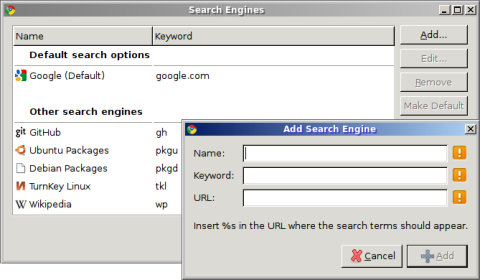
Custom search engines I use
Name                Keyword     URL
-------------------------------------------------------------------------------------
TurnKey Linux       tkl         /search/luceneapi_node/%s
Ubuntu Packages     pkgu        http://packages.ubuntu.com/%s
Debian Packages     pkgd        http://packages.debian.org/%s
GitHub              gh          http://github.com/search?q=%s
Wikipedia           wp          http://en.wikipedia.org/wiki/Special:Search?search=%s
Notes on package searching
I usually use apt-cache search search_term when I'm at the command line, but I find that using the Ubuntu and Debian web interfaces useful when exploring new packages and their dependencies while working on appliance development.
What custom search engines do you use?
I still use Firefox during web application development, and for certain plugin's which I have yet to find replacements for in Chrome - for example, chatzilla and firebug (I do use chrome's internal web dev tools, but I still find firebug superior in some situations).
I'll certainly take a closer look at the resources you mentioned.