From the project
Django navigation bar (active link highlighting)
Every web application needs a navigation bar. Common practice is to indicate to the user where he or she is, and is usually implemented by using a visual aid such as a bold type-face, different color or an icon.
I wanted an elegant, generic, extendable solution to "highlight" a link on the navigation bar without hardcoding URLs, using ifequals, or using template block inheritance by specifying a navbar block on each and every template (you'd be surprised, but the above mentioned are recommend often).
The solution I came up with is quite simple.
- No need to hardcode URLs (using urlconf names).
- Navbar is only specified in the base template (actually a separate template loaded by the base template).
- By using a simple template tag and the request context processor, "active" will be returned if the "link" should be active.
- Supports multiple URLs for each link.
- CSS is used to highlight the active link.
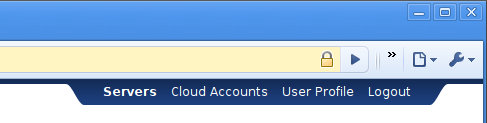
You can see the above in action on the TurnKey Hub.
On to the code
First up, we need to enable the request context processor.
settings.py

TEMPLATE_CONTEXT_PROCESSORS = (
    ...
    'django.core.context_processors.request',
)
Next, create the template tag navactive.
Note: the navigation sitemap I'm using is flat, but you can tweak the code to support multiple levels quite easily.
apps/<myapp>/templatetags/base_extras.py

from django import template
from django.core.urlresolvers import reverse

register = template.Library()

@register.simple_tag
def navactive(request, urls):
    if request.path in ( reverse(url) for url in urls.split() ):
        return "active"
    return ""
Now for a little CSS styling...
media/css/style.css

.navbar .active {
    font-weight: bold;
}
With all the above in place, we can create the navigation bar template code.
templates/navigation.html

{% load base_extras %}

<div id="topbar">
    <div class="navbar">
        <div class="navbar-side navbar-left"></div>
        <div class="navbar-content">
        {% if user.is_authenticated %}
            <a class="{% navactive request 'servers help_server' %}"
                href="#">Servers</a>

            <a class="{% navactive request 'account_clouds help_registeraccount
                href="#">Cloud Accounts</a>

            <a class="{% navactive request 'account_details' %}"
                href="#">User Profile</a>

            <a href="#">Logout</a>
        {% else %}
            <a href="#">Login</a> or
            <a href="#"><b>Sign up</b></a>
        {% endif %}
        </div>
        <div class="navbar-side navbar-right"></div>
    </div>
</div>
And finally, include the navigation bar in the base template so the navigation bar shows up on each page.
templates/base.html

{% include "navigation.html" %}