From the project
TurnKey 13 critical security issue (Heartbleed / CVE-2014-0160)
Without action, your TurnKey 13 installations may remain vulnerable to the critical Heartbleed OpenSSL attack (DSA-2896-1 CVE-2014-0160). This is not a theoretical attack. A remote exploit already exists in the wild.
TurnKey installations are configured to install security updates automatically. Unfortunately, according to our testing installing the update is not enough.
For the fix to take effect you'll need to either:
1) Reboot your system:
/sbin/reboot
2) Individually restart any service (e.g., webserver, shellinabox, webmin, etc.) that uses the OpenSSL library:
/etc/init.d/apache2 restart
/etc/init.d/nginx restart
/etc/init.d/lighttpd restart
/etc/init.d/shellinabox restart
/etc/init.d/webmin restart
Your private SSL key may already have been stolen
Fixing this vulnerability only protects you from future attacks. An attacker can use this attack to read arbitrary chunks of server memory containing private keys, sensitive login credentials or supposedly encrypted communications. The implications of this are profound.
If an attacker has already exploited heartbleed to to steal your SSL private key she can decrypt all past and future encrypted traffic even after the vulnerability has been fixed.
If this concerns you, you may want to seriously consider issuing new private keys and passwords for all effected services.
Are your servers vulnerable?
Debian Wheezy (stable), OpenSSL 1.0.1e-2+deb7u4 (vulnerable)
Debian Squeeze (oldstable), OpenSSL 0.9.8o-4squeeze14 (not vulnerable)
TurnKey 12.x solutions (based on Debian Squeeze) are NOT vulnerable to Heartbleed, as they shipped with a version OpenSSL that is not affected.
TurnKey 13.x solutions (based on Debian Wheezy) ship with a version of OpenSSL that IS vulnerable.
Additionally, the appropriate steps need to be taken for potentially leaked primary key material, secondary key material, protected content and collateral.
What about new deployments?
New deployments should not be affected as security updates are applied before the services are started.
Testing for vulnerability
You can use either the online or CLI utilities to test for Heartbleed:
Further reading
Comments (33)
Another suggestion
Reply 1Autocomplete support is a good idea
Reply 2That's not a bad idea John
Reply 3I just put a new 'issue' on the TKL tracker
Hehe! Nice work Liraz... Too fast for me! :)
Re: Installing security updates
Reply 4Aah, I never knew that command existed. I've always been searching through inithooks to find the file. One thing I'd recommend though is prefixing all of these special commands with turnkey- so they can easily be found by typing turnkey<tab><tab>.
You may still need to reboot
Reply 5To enable usage of the updated components all services that are using OpenSSL need to be restarted. The easiest way to do that is to reboot...
unless of course you are running your server on S3 backed Amazon instance (or some other platform that doesn't support rebooting and keeping your data...). If that's the case you'll need to work out which services need restarting and restart them, or do a TKLBAM backup and restore to a new instance...
Installing security updates
Reply 6Meanwhile you can install security updates manually with the following command:
install-security-updates
Invoking inithooks to regenerate keys
Reply 7/usr/lib/inithooks/firstboot.d/15regen-sslcertI'm not sure whether this is strictly necessary but if you're concerned about the SSH key as well:
/usr/lib/inithooks/firstboot.d/10regen-sshkeysNote that if you do this SSH will complain afterwards regarding the changed key. You'll need to edit $HOME/.ssh/known_hosts to remove the line containing the old key.
You should be fine...
Reply 8When installed on first boot, OpenSSL would have installed before the services that rely on it would have started so you should be fine. Also the self-signed certs would have been regenerated.
updates at install time - first boot
Reply 9I just reinstalled the torrentserver and the fileserver on static IP and they both updated automatically.
Small window on New Systems may turn into a large window.
Reply 10Systems which run on static ip's (rather than DHCP) do not get system updates at install time - first boot. It would be great if Networking could be defined before updates are called as it often happens that having installed a new system, then a static ip, Apt-Get updatemay not be configured to auto-run.
Perhaps system updates are automatic but it seems that if not called at first boot these are not always automatic.
Thank you for the notice on this. In terms of "issuing new keys" what would be the best proceedure? Any risk of losing control of ones system in the process?
SSH keys may be at risk, better safe than sorry
Reply 11OTOH, if SSH (or any other process) doesn't fully wipe out sensitive key material from memory before a sub-process exits it may be possible for the SSH key to eventually find itself in the SSH process's memory space.
It might be overkill to generate the SSH keys but better safe than sorry I guess:
/usr/lib/inithooks/firstboot.d/10regen-sshkeys
SSH keys also at risk?
Reply 12I'm certainly no expert when it comes to security, but from some of the articles on Heartbleed I gathered that SSH keys are also at risk because they are stored in memory on the server. After all the updates are in place, I plan to regenerate all new keys for users and hosts. I know that most of my virtual hosts are probably safe because they weren't exposed to the Internet but it's as hard to figure out which ones have exposure as it is to change them all.
Purchased SSL certs will need to be reissued
Reply 13If (purchased)SSL Certs are on Sites, do they need to be rebuilt
Reply 14Does the OpenSSL system also effect the key generation for Name Based SSL Certs or is this just for the self generated Certs that run by default on WebShell, Webmin and Apache without further configuration of SSL?
This bug should only affect TKL v13.0
Reply 15TKL v13.0 (based on Debian Wheezy) has OpenSSL v1.0.1e. But the security bug was patched in 'openssl 1.0.1e-2+deb7u5' (see DSA-2896 and/or CVE-2014-0160).
FWIW the current Wheezy OpenSSL package is 'openssl 1.0.1e-2+deb7u6'.
Also AFAIK (and according to the DSA & CVE I linked to above) it wasn't patched in later versions of Debian until 1.0.1g-1 (patch applied to 1.0.1g in Jessie/testing and Sid/unstable). Not sure what that means for upstream or other platforms though...
Status of different versions of OpenSSL
Reply 16What versions of the OpenSSL are affected?
OpenSSL 1.0.1 through 1.0.1f (inclusive) are vulnerable
OpenSSL 1.0.1g is NOT vulnerable
OpenSSL 1.0.0 branch is NOT vulnerable
OpenSSL 0.9.8 branch is NOT vulnerable
Bug was introduced to OpenSSL in December 2011 and has been out in the wild since OpenSSL release 1.0.1 on 14th of March 2012. OpenSSL 1.0.1g released on 7th of April 2014 fixes the bug.
Yes that is correct
Reply 17As per usual practice in Debian, security patches are backported to the stable version, rather than an updated version being included (which might accidentally break things). That's why they call it Debian stable! :)
FWIW I'll give you a little more info so you can see for yourself (rather than just having to take my word for it...)
If you have a look at the OpenSSL package in Debian Wheezy you will see that the version is '1.0.1e-2+deb7u6'. The 'u6' on the end means that this one is the 6th update since the package version was frozen (when Debian 7 was in the process of moving from 'testing' to 'stable'). If you have a look at the bug reports for OpenSSL on Debian 'stable' firstly you'll see that things have obviously moved pretty fast as this is actually the bug page for '1.0.1e-2+deb7u4' (2 updates ago). But you'll see that "CVE-2014-0160 heartbeat read overrun (heartbleed)" gets a mention right near the top. The fact that the bug number (#743883) is struckout out is a dead giveaway that it has been fixed. You'll also notice that both the bug number and the name are both links. They link to the full bug report log. If you scroll down to message #14 you'll see that on Mon, 7 Apr 2014:
found 743883 1.0.1e-2
fixed 743883 + 1.0.1-g
fixed 743883 + 1.0.1e-2+deb7u5
close 743883
FWIW it looks like it was actually fixed in '1.0.1e-2+deb7u5' so there has actually been another update since Monday when this bug was fixed... As the changelog docs aren't yet available we can't (at least easily) see why they released another new version but they did...
Thanks!
Reply 18Thanks, Jeremy! I just restarted anything that could be restarted. If it couldn't, well, I didn't. It didn't take too long.
Drew
That's why Alon suggested reboot
Reply 19Generally the relevant webserver (and perhaps openssh-server) would be the ones to restart. But then Webmin has it's own miniserver (so you'd need to restart that too).
So easiest thing to do is reboot (assuming you're not running on an S3 backed AWS server!!)
Determining Services using OpenSSL
Reply 202) Individually restart any service (e.g., webserver, shellinabox, webmin, etc.) that uses the OpenSSL library:
OK... I'll bite. How do I determine which services utilize OpenSSL?
My submission is triggering the spam filter... ugh!
Drew
Great post Drew! :)
Reply 21Nice work mate! Sometimes us Linux guys forgot that some people don't know off the top of their head which Toy Story character is associated with which version of Debian! :)
I Googled it, too
Reply 22Google Query: how to determine which version of debian I'm running?
First response took me to a forum and about 2/3 down the page, there was this command:
uname -a && cat /etc/*release
Here's my server's response:
Linux pbtracks 3.2.0-4-amd64 #1 SMP Debian 3.2.54-2 x86_64 GNU/Linux
PRETTY_NAME="Debian GNU/Linux 7 (wheezy)"
NAME="Debian GNU/Linux"
VERSION_ID="7"
VERSION="7 (wheezy)"
ID=debian
ANSI_COLOR="1;31"
HOME_URL="http://www.debian.org/"
SUPPORT_URL="http://www.debian.org/support/"
BUG_REPORT_URL="http://bugs.debian.org/"
In Webmin, go Tools > Command Shell:
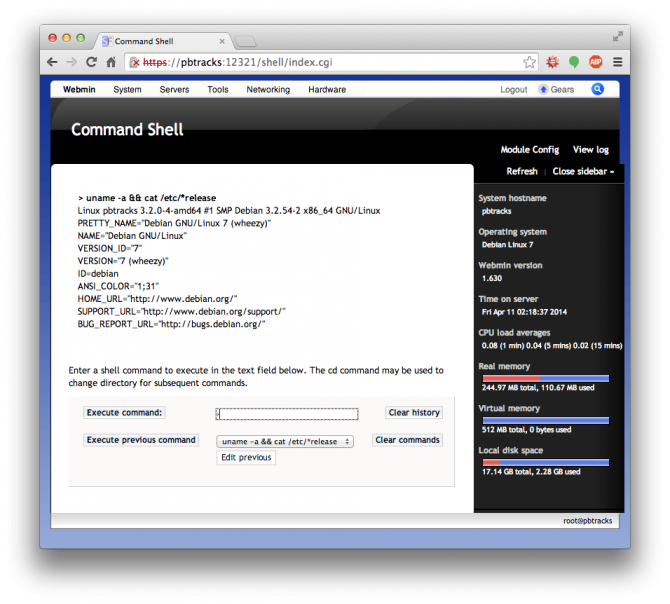
Drew
Re: How do I find out what version
Reply 23Starting with wheezy (7.x) lsb_release -a also displays the Debian release number and name;
# lsb_release -a
No LSB modules are available.
Distributor ID:    Debian
Description:    Debian GNU/Linux 7.4 (wheezy)
Release:    7.4
Codename:    wheezy
but you have to remember the '-a' otherwise you only get the unhelpful first line. I always forget that and think it's broke.
Quite likely in Windows
Reply 24But because of the way that Linux usually does things (i.e. via package management) it is unlikely that any apps (at least ones installed by package management) would have that sort of issue...
Thanks Michael
Reply 25FWIW I signed up and added this blog post/announcement to the list (plus Amazon's...)
Similar response to my post above...
Reply 26Generally in Linux apps are built in a very modular way and use common libraries to fulfill common functions. So it would be highly uncommon for any app like PHP to be a problem on Linux (as it would rely on the OpenSSL package for SSL).
So in the case of Linux as long as software was installed from package management (and often even third party installs) would use the OpenSSL package from the repo. Thus only OpenSSL needs replacing (and the program restarted).
As I also wrote in a comment above, the version in Linux is not always indicative of specific security bugs. Debian Wheezy (aka 7 - the basis of TKL v13.0) still has OpenSSL 1.0.0e - but it is no longer vulnerable (as of package 1.0.0e-2+deb7u5).
Wunderlist Email on Heartbleed (summary at bottom)
Reply 27Wunderlist, which I don't actually use just sent me the following in email:
How we fixed the Heartbleed bug
As you opened up Wunderlist today, you would have noticed that you had been logged out. We did this to protect your data against an internet-wide security vulnerability called ‘Heartbleed’. Heartbleed affects the OpenSSL framework which is used by many websites to privately send data to and from an internet server.
For you, this now means you’ll have to simply log back intoWunderlist. We also strongly recommend that you reset your password for Wunderlist.
Reset Password We want you to know, that we’ve made Wunderlist’s Sync Service completely safe from Heartbleed, and this is how we’ve kept your data safe and sound:
- As soon as we were made aware of Heartbleed, we protected your data by preemptively turning off our Sync Service, eliminating any potential security breaches by stopping all communication to our servers.
- We deployed the updated OpenSSL libraries.
- We then renewed all of our SSL certificates.
- We logged out all users to ensure that everyone would create new, secure connections.
Want to know more?
If you have any questions or want to learn more, please take a read of our in-depth article at the Wunderlist Support Center. Also, one of our engineers, Duncan Davidson, has written a personal account of what happened in more technical detail.
Check your permissions
Reply 28Check the permissions of your ssl certs. They should be readable by group certssl.
# ls -l /etc/ssl/certs/cert.*
-rw-r----- 1 root certssl  834 Oct 25 00:33 /etc/ssl/certs/cert.crt
-rw-r----- 1 root certssl  887 Oct 25 00:33 /etc/ssl/certs/cert.key
-rw-r----- 1 root certssl 1721 Oct 25 00:33 /etc/ssl/certs/cert.pem
If they are only readable by root, apache will complain.
Also check your sites-enabled
Reply 29You didn't specifically mention which appliance you are using. Mine is a drupal7 appliance hosting a drupal6 install. In my /etc/apache2/sites-enabled/ I have config files for drupal6, drupal7 and phpmyadmin. Both drupal configs have an entry for SSLCertificateFile pointing to the aforementioned cert.pem. If you also have a default-ssl, it may be using a different cert, /etc/ssl/certs/ssl-cert-snakeoil.pem. Make sure you have a SSLCertificateFile setting in one of your available sites-enabled and that it points to the TurnKey generated cert.pem with the correct ownership and permissions.
Great suggestion John
Reply 30I have added it to the TKL Issue tracker. Thanks! :)
Now might be a good time to implement Forward Secrecy
Reply 31With all the attention that HeartBleed has brought to security, now might be a good time to think about implementing Forward Secrecy, sometimes referred to as 'Perfect' Forward Secrecy or PFS in all TurnKey appliances that use OpenSSL. Forward Secrecy protects against the future compromise of your private keys revealing the contents of prior communications. Forward Secrecy is already implemented in OpenSSL but is usually not configured.
After applying the HeartBleed updates and generating a new set of self-signed certs, I looked into implementing PFS. I'm currently running nginx configured as a reverse-caching-proxy and setup to handle all SSL requests for my backend apache servers. The configuration allows me to handle multiple domains while having a single external IP address.
"Enabling forward secrecy can be done in two steps:
- Configure your server to actively select the most desirable suite from the list offered by SSL clients.
- Put ECDHE and DHE suites to the top of your list. (The order is important; because ECDHE suites are faster, you want to use them whenever clients supports them.)"
I followed the configuration advice for nginx from Qualys Security Labs (links below). I did have to modify their example slightly to get nginx to accept it (doesn't like '\'). My nginx config now looks like this:
ssl_params
server_tokens off;
ssl_protocols        SSLv3 TLSv1 TLSv1.1 TLSv1.2;
ssl_prefer_server_ciphers on;
ssl_ciphers EECDH+ECDSA+AESGCM:EECDH+aRSA+AESGCM:EECDH+ECDSA+SHA384:EECDH+ECDSA+SHA256:EECDH+aRSA+SHA384:EECDH+aRSA+SHA256:EECDH+aRSA+RC4:EECDH:EDH+aRSA:RC4:!aNULL:!eNULL:!LOW:!3DES:!MD5:!EXP:!PSK:!SRP:!DSS;
keepalive_timeout    60;
ssl_session_cache    shared:SSL:10m;
ssl_session_timeout  10m;
ssl_prefer_server_ciphers tells the server to choose a matching cipher from the list in the order given. Specifying each cipher explicitly makes sure that the most secure, highest performance ciphers are given highest priority, but the list may need to be updated from time to time. I chose to include SSLv3 to support older clients even though it does not support Forward Secrecy.
References:
https://community.qualys.com/blogs/securitylabs/2013/06/25/ssl-labs-depl...
https://community.qualys.com/blogs/securitylabs/2013/08/05/configuring-a...
Article about the guy who inadvertently introduced the bug
Reply 32I just came across an interesting article in the Sydney Morning Herald quoting public statements made by Dr Robin Seggelmann regarding his inadvertent introduction of the 'Heartbleed' bug into OpenSSL. Have a read here.
I find it particularly interesting that whilst he takes responsibility for introducing the bug, he ultimately blames lack of resources for the OpenSSL software as being the main factor... Raises the valid point that if you care about free open source software then people need to put their money and/or their time where their mouths are! :)
Hi Steve
Reply 33Glad you worked it out. The info you show in your first post does appear a little misleading and I think your confusion is not unreasonable. However if you look further up this thread then you can see a discussion that covers the upgraded OpenSSL package, that may (hopefully) make it a little clearer.
FYI a line that I find handy for finding out info about packages is:
apt-get update && apt-cache policy <packagename>
Liraz,
Another suggestion would be to link 'turnkey-console' to 'confconsole'. I can remember confconsole now after using TurnKey for a number of years, but new users might find a consistent naming scheme easier to use.