From the project
Launching TurnKey Hub into private beta: cloud deployment simplified
Towards the end of last year we decided it was time to start working on an idea we've been toying with for a while. Mapping out the feature set was fun, and a lot of the current and future features are based on feedback we received from you guys and gals, as well as many related questions and comments from around the net.
Today after a last round of internal testing we are pleased to announce that we've launched TurnKey Hub into private beta:

We've just sent out the first batch of invites. If you've already requested an invite, you should receive one as we roll them out. Please be patient. We initially have limited capacity so it's first come, first served.
What is this TurnKey Hub?
- The short version: TurnKey cloud deployment: simplified.
- The slightly longer version: An easy way to launch and manage TurnKey Linux appliances in the Amazon EC2 cloud (more clouds and VPS providers on the way).
A simple Amazon EC2 console optimized for TurnKey
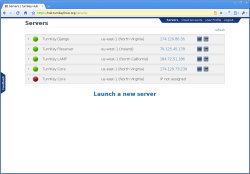
- Launch TurnKey appliances in the click of a button.
- TurnKey optimized firewall templates.
- Configure custom passwords on launch.
- Authenticate with personal SSH key in addition to EC2 keypairs.
- Automatically setup EBS devices and Elastic IP's on launch.
- Easier management with descriptive labels for all assets.
- Unified interface for all regions and all your EC2 accounts.
And that's just the tip of the iceberg. There's much more in development...
Upcoming features
- More clouds: Support all clouds and VPS providers.
- Backup: Automatic encrypted appliance backups.
- Migration: Automatically restore backups anywhere.
- You decide: Suggest features and help us prioritize.
In other words this is just the first modest step in a much more ambitious plan to continue making TurnKey easier to use, as Liraz recently explained:
"Imagine being able to develop your site on a locally running appliance (e.g., running in VirtualBox or VMWare). Then, when you're ready you can automatically migrate your appliance, with all your customizations to a cloud hosting provider of your choice."
So once you receive your invite, take the Hub for a spin, let us know what you think. We'd like to know how to make this better. What new features you'd like to see implemented. That sort of thing.
Remember, you can request an invite here.
Currently, if you want your data to survive instance termination you should store it in an EBS volume. But it's not automatic.. yet. The next major feature we'll add into the Hub is automatic backup and migration which will take care of that usage scenario and many others.
Regarding security, that's a good question. I think it would make a good idea to dedicate a blog post to this but I'll cover the main points right now:
The precautions we're taking, coupled with our background mean that it's far more likely in my opinion that your access keys / credit card / bank account credentials will be stolen via malware running on your PC (for example). Nothing is perfect but if you already accept the risk of doing any sort of commerce on the Internet you shouldn't loose any sleep over the Hub storing your AWS keys.
Note that Amazon allows you to create a separate set of Amazon keys you can use just for the Hub if you believe this reduces your risk. You can then revoke the keys at any time.