From the project
New release candidates for TurnKey Linux 11.0 (part 1)
We've pushed out new RC (Release Candidates) builds for part 1 of the upcoming TurnKey Linux 11.0 release and we need your help testing them! See the appliance pages for download links.
The current crop of release candidates only include Ubuntu Lucid based ISO images for now. Debian Lenny based images will follow, as will builds specially optimized for the the full range of supported virtualization and hosting platforms (e.g., VM build, EC2 AMIs, ESX4, Xen, Eucalyptus, etc.).
In part 1 we've updated all the existing appliances except for Zimbra and Openbravo which we haven't got to yet. They'll be in part 2 along with all the fantastic new appliances developed during the community development contest.
We broke up work on the next release into two parts because with all the new appliances the size of the appliance libary is doubling and that was a bit too much to handle in one go.
Also, Alon is flying off to Orlando today for the Ubuntu Developer Summit and we wanted to have something out the door to show off to our friends in the Ubuntu community.
New versioning scheme
Instead of date based versions the new versioning scheme tracks TurnKey Core, regardless of the date or the underlying distribution.
In other words a TurnKey Linux 11.0 appliance based on Ubuntu Lucid and a TurnKey Linux 11.0 appliance based on Debian Lenny are the same version because they have the same Core features.
We're also hoping to get rid of some of the confusion with date based releases. For example, we pushed out the maintenance release 2009.10-2 in April 2010 but the version confused many people into thinking the appliances were obsolete, even though Hardy will be supported for another 3 years and security updates were installed on first boot and daily afterwards.
Now built-in: TKLBAM (TurnKey Linux Backup and Migration)
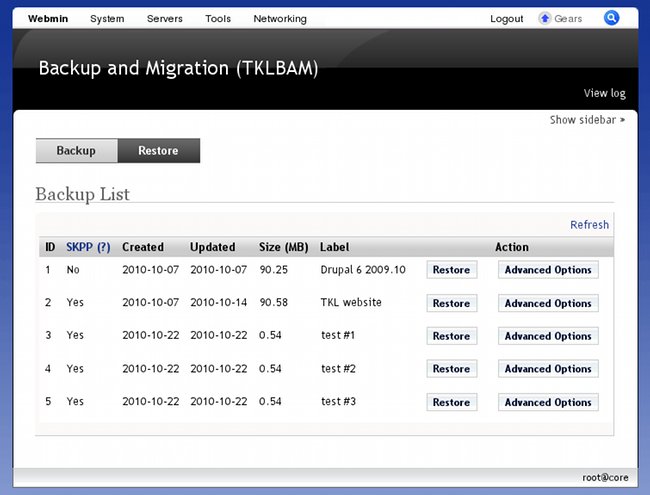
TKLBAM, which we announced a few weeks back as a separate component, is now tightly integrated with TurnKey out of the box. This includes a spiffy new Webmin module so users who dislike the command line can fully enjoy TKLBAM from the comfort of their web browser. Now you can backup and migrate fully working systems anywhere with literally just a few mouse clicks.
As an old school Unix guy who loves the command line, what I like the most about the new Webmin module is how it facilitates easy discovery of TKLBAM's functionality and ties everything together seamlessly. No need to memorize funny command line flags or decipher manual pages for configuration options. At a glance you can see what can be done. If you don't understand something you just click on the question marks for embedded help pop-ups.
Screenshot #1: backup menu

Screenshot #2: restore menu
New Core features
Besides TKLBAM integration, we've made a broad range of improvements to the Core features shared by all appliances. In fact one could argue more has changed between the last beta and the release candidate than between the previous release and the beta.
Basic configuration dialogs on first boot: Previously only ISO builds would prompt you, during installation, to configure the appliance (e.g., set passwords). Users of the pre-installed builds (e.g,. the virtual machine build for VMWare/VirtualBox) had to do basic configuration by hand.
With the new mechanism, the user experience is consistent for all build types. Also the first boot configuration mechanism is modular so appliance customizers can easily add their own hooks.
LVM (Logical Volume Management) support: instead of installing the appliance filesystem to a naked partition, we setup LVM by default. This makes it much easier to adjust storage capacity later. Also it adds basic support for filesystem snapshots, which future versions of TKLBAM may leverage to support new kinds of databases.
auto-apt-archive: uses GeoIP to automatically configure closest APT package archive for maximum network performance.
Command line convenience: a range of small improvements that make working with the command line a bit more comfortable:
smart, programmable bash shell completion: helps you get more done with fewer keystrokes.
support for $HOME/.bashrc.d hooks (see my blog post about shell hooks)
persistent environment variables (see $HOME/.bashrc.d/penv):
penv-set foo=bar
exit

# later...
echo $foo
Inverted webshell color scheme: real men use white on black for their command line shells. And they like it!
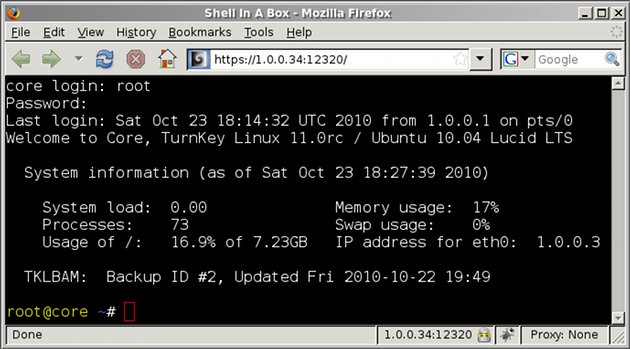
- Display system info in the login motd: seen in the above screenshot.
Appliance specific changes
- The latest and greatest: all appliances are now built using the newest software packages available with Long Term Support from Ubuntu. For software not available in the package management system (e.g., redmine), the latest stable software versions from upstream are used instead.
- A range of performance optimizations: for example...
- All LAMP-based appliances now includes xcache for PHP opcode caching which improves PHP performance, as code only has to be recompiled by PHP into opcode if it changes, and not on every page load.
- All Rails based appliances now come with Ruby Enterprise which improves memory performance, traditionally one of Ruby's weak points.
- Many small improvements and bug fixes
- Exciting potential for new bugs: as yet unidentified.
Distribution level changes
Upgraded base distribution: from Ubuntu 8.04.3 to Ubuntu 10.04.1
The good: newer packages based on a new Ubuntu LTS release which will be supported for 5 years.
The bad: roughly 50MB in additional bloat for all appliances. This is mostly a consequence of bloated dependencies within the new Ubuntu version. Some of the dependencies are unnecessary for our use case (e.g., plymouth) but the only way to get rid of them is to fork the packages and we'd rather avoid that.
Fortunately, the upcoming Debian Lenny based builds do not have this extra bloat so anyone who cares will have an alternative.
No more pinning: As discussed earlier we've discontinued use of complex package management configurations to achieve mixed hybrids of Ubuntu and Lucid.
In the works...
- Debian Lenny based equivalent builds
- PostgreSQL support for TKLBAM
- Part 2 of the TurnKey with dozens of new appliances
- 64-bit support (it's about time!)
That's all folks! Any questions?
The webmin module for TKLBAM is the most interesting new thing :) . Also using LVM by default is a good decision.