From the project
Which TurnKey app should I use? Seven common jobs
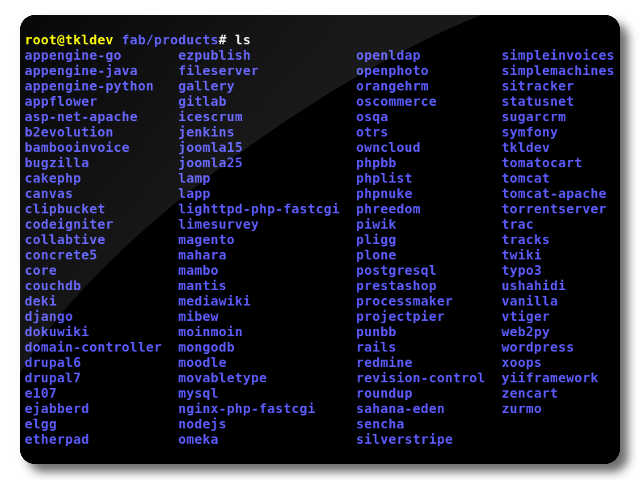
The app library has nearly 90 current appliances. That is useful when you know the software name. It is less useful when all you know is the job that needs doing.
Here are seven ordinary starting points.
Publish a website
Use WordPress when editors need a familiar content system, themes and plugins. Use LAMP when you have your own PHP application. If you are still deciding between those two, our LAMP or WordPress guide has the short version.
Share files on a local network
File Server provides Samba shares for Windows, macOS and Linux clients. It suits a household, studio or small office that wants ordinary shared folders. Add a separate backup because mirrored disks and backups solve different failures.
Connect safely from somewhere else
OpenVPN can provide remote access to a private network, connect two sites, or route a device through a gateway you control. Those modes are not interchangeable. Choose the OpenVPN setup by use case before changing routes.
Watch routers, switches and servers
Observium collects SNMP telemetry and turns it into useful history. Start with the network path people depend on. A week of normal graphs makes the next outage much easier to explain.
Run Git repositories for a team
GitLab combines Git hosting with issues, merge requests and CI features. It is capable software and wants capable hardware. Check the current requirements before putting it on the smallest VM you can find.
Manage projects without turning email into a database
Redmine handles issues, milestones, wikis and multiple projects. It works well when the team wants a straightforward tracker that can be adapted with fields and workflows, but does not need an entire software forge.
Keep an address book and file sync under your control
ownCloud provides file synchronization and sharing, with clients for common desktop and mobile platforms. Decide who can create public links and how much storage each user gets before inviting everybody.
When the application is not listed
Search the library by category or name. If there is no dedicated appliance, one of the stack appliances may still be the right base. That is a build decision, not a consolation prize. A smaller base can be easier to understand than a specialized image for software you do not intend to use.
Whatever you choose, write down how it is backed up, who gets update notices and how to replace it. Installation is the first hour. Operations are the years after it.