Hi I am using the owncloud applicance.
However, the owncloud version has SMB bugs and the developers advise me to upgrade from 5.0.12 to 5.0.14.
But how can I do this?
apt-get dist-upgrade does not upgrade owncloud to a higher version. Is there a way?
Replies (28)
TKL ownCloud appliance uses the ownCloud community repo
Reply 1TBH I have no idea...
Reply 2Until I get a chance to sit down and try this out myself my answers will only be guesses...
upgrade
Reply 3I do not get an error message..I havent yet.While there if you upgrade the database to include the question of what happens? Do I need to set up a new database?If only the interface will change?
I need more info
Reply 4I need more info to try to help you out... Like specific error messages, a log of what happened during the upgrade, etc... Besides it shouldn't have affected the files, although there may be database changes that make them display differently etc.
Also I didn't test it, I just passed on info gleamed from google... In afterthought, I have just considered that perhaps the TKL ownCloud appliance doesn't have the latest 5.0.x package installed, in which case we should have upgraded to 5.0.15 first...
When I get a chance I will set up a TKL ownCloud server, put some files in it and test the upgrade...
I guess worst case scenario you could reinstall the old package and restore your backup (you did run a backup before you updated right?!). OwnCloud packages can be downloaded from here.
Great!
Reply 5Thanks for posting back to confirm that it works! :)
Thanks! Upgraded from 5.0.12
Reply 6Thanks! Upgraded from 5.0.12 to 6.0.2 without problems
apt-get install should do it
Reply 7So at the commandline of your appliance (either via SSH or Webshell) type:
apt-get update && apt-get install owncloud
It should say that it will download a significant amount of files (mine wants to download 164MB!) so just hit 'y' and let it run through... If for some reason it doesn't do that you could try:
apt-get install owncloud=6.0.2-1
Please note that these instructions will date quickly and once there is a new release the last bit ('=6.0.2-1') will need to correspond to the full new version number. That can be discovered with this command:
apt-cache showpkg owncloud
use script
Reply 8Great work
Reply 9And thanks for posting back. :)
Perhaps run apt-get update first
Reply 10apt-get update will update the available package lists which should (hopefully) allow you to update.
However, the ownCloud package hasn't always been available and if you have a very old TurnKey ownCloud appliance it may have been prior to ownCloud being installed by package management. If so I suggest that you migrate your data to a new TKL ownCloud instance and then update ownCloud to the latest.
my turnkey dont find owncloud
Reply 11root@owncloud ~# apt-get install owncloud=6.0.3
Reading package lists... Done
Building dependency tree
Reading state information... Done
E: Unable to locate package owncloud
root@owncloud ~# apt-cache showpkg owncloud
N: Unable to locate package owncloud
root@owncloud ~#
Thanks again for your great info John
Reply 12It sounds a bit tricky. I guess that's part of the issue with having such a long break between TurnKey maintenance releases... Also it seems like we might need to configure some TKLBAM hooks to make the migration process (from v13.0 -> v13.1) reliable...
Glad to hear you got the upgrade to work
Reply 13I tried upgrading from version 7.0.2 to 8.0 using 'apt-get install owncloud-server' but it was not a clean upgrade. Somehow the file '/var/www/owncloud/.htaccess' was removed but not replaced with the correct version, and the new file ownership and permissions were incorrect.
I had to download the version 8.0 .htaccess file from https://github.com/owncloud/core. Next I copied a script from https://doc.owncloud.org/server/8.0/admin_manual/installation/installation_wizard.html#setting-strong-directory-permissions. The script had to be modified as follows to correctly handle all the .htaccess files. I called it fix-perms.
#!/bin/bash
ocpath='/var/www/owncloud'
htuser='www-data'
find ${ocpath}/ -type f -print0 | xargs -0 chmod 0640
find ${ocpath}/ -type d -print0 | xargs -0 chmod 0750
chown -R root:${htuser} ${ocpath}/
chown -R ${htuser}:${htuser} ${ocpath}/apps/
chown -R ${htuser}:${htuser} ${ocpath}/config/
chown -R ${htuser}:${htuser} ${ocpath}/data/
chown root:${htuser} ${ocpath}/.htaccess
chown root:${htuser} ${ocpath}/data/.htaccess
chown root:${htuser} ${ocpath}/config/.htaccess
chmod 0644 ${ocpath}/.htaccess
chmod 0644 ${ocpath}/data/.htaccess
chmod 0644 ${ocpath}/config/.htaccessAfter that, I was able to login and run the database update. Fortunately, the data directory and config.php files were not disturbed. So far it looks like everything is working okay. I'm using owncloud-client ver 1.7.1 on Ubuntu 14.04 LTS.
The ownCloud repositories have changed
Reply 14I tried and failed to upgrade from version 5 installed by TurnKey. Instead, I did a fresh install following the directions at the OpenSuse page https://software.opensuse.org/download/package?project=isv:ownCloud:community&package=owncloud (be sure to click on the Debian symbol)
The instructions there got me to version 7.0.2, but I could never get any upgrades past that. I recently discovered that they changed the package name from 'owncloud' to 'owncloud-server' but failed to update the instructions. Installing owncloud-server will remove older versions of owncloud and replace with the latest 8.x.x version of ownCloud. When I get time, I'll build a new iso with latest version.
For Debian 7.0 run the following as root:
echo 'deb http://download.opensuse.org/repositories/isv:/ownCloud:/community/Debian_7.0/ /' >> /etc/apt/sources.list.d/owncloud.list apt-get update apt-get install owncloud-server
You can add the repository key to apt. Keep in mind that the owner of the key may distribute updates, packages and repositories that your system will trust (more information). To add the key, run:
wget http://download.opensuse.org/repositories/isv:ownCloud:community/Debian_7.0/Release.key apt-key add - < Release.key
Timing may be at work here ..
Reply 15I noticed that the day after I conducted my last tests, a new version, 8.0.0-9, of owncloud-server was released. I haven't had time to re-test, but I think they fixed the missing file issue.
Not yet fixed for me
Reply 16I'm also on a Proxmox vm. I rolled back to version 7.0.2 and then ran the same commands individually. When I tried to run the update via the webpage, I get
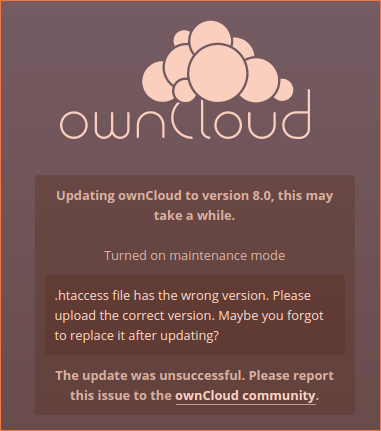
I had previously reported the problem upstream and the fix is scheduled for version 8.0.1. Will just have to be patient.
What version of ownCloud are you starting at? There must be something different in our environments if your update is successful and mine isn't.
Great detective work! :)
Reply 17When I had a play with it previously I too was surprised that it wouldn't install when you specified it explicitly with apt-get install owncloud. I was under the impression that that should make it install the next version. Obviously not! Hence why I discovered the version match method to force it to upgrade.
Additional information
Reply 18I received a reply from the ownCloud package maintainer telling me, that I should not be using apt-get install owncloud-server. I started over (thank God for snapshots) and tried apt-get update && apt-get upgrade && apt-get install owncloud once more, but still no joy. I tried cleaning the apt cache and running apt-get install -f owncloud but still no luck. I checked the repository and found that both old and new versions were present.
# apt-cache show -a owncloud Package: owncloud Version: 8.0.2-8 Architecture: all Maintainer: Jürgen Weigert <jw@owncloud.com> Installed-Size: 49 Depends: owncloud-server-core, owncloud-config-apache Recommends: mysql-server, curl, exim4 | mail-transport-agent Suggests: clamav | clamav-daemon, smbclient, libreoffice-writer Conflicts: owncloud-fhs Provides: owncloud Filename: ./all/owncloud_8.0.2-8_all.deb Size: 26922 MD5sum: fb03273b2431f01d4cb2e462f346d61a SHA1: eb0d9d6c8eb293d88666e4e3e087ea3413d0fa51 SHA256: b67f6ae57a9d3d6e116975a4c1f9081f9110c62d387ac5a02292a116a9aae8af Section: devel Priority: optional Description: ownCloud Server - Private file sync and share server ownCloud Server provides you a private file sync and share cloud. Host this server to easily sync business or private documents across all your devices, and share those documents with other users of your ownCloud server on their devices. . ownCloud - Your Cloud, Your Data, Your Way! www.owncloud.org Package: owncloud Status: install ok installed Priority: optional Section: devel Installed-Size: 103611 Maintainer: Jürgen Weigert <jw@owncloud.com> Architecture: all Version: 7.0.2-1 Depends: apache2 | httpd, php5 (>= 5.3.3), php5-mysqlnd | php5-mysql, php5-sqlite, php5-pgsql, php5-common, php5-gd, php-xml-parser, php5-intl, php5-mcrypt, php5-curl, php5-json, ntp | time-daemon Recommends: curl, exim4 | mail-transport-agent, php5-imagick, php5-apc Suggests: clamav | clamav-daemon, smbclient, libav-tools | ffmpeg, libreoffice-writer Conffiles: /etc/apache2/conf-available/owncloud.conf 8e2ddaaca00711d181fc467c11fbaad9 /etc/apache2/conf.d/owncloud.conf 8e2ddaaca00711d181fc467c11fbaad9 Description: ownCloud Server - Private file sync and share server ownCloud Server provides you a private file sync and share cloud. Host this server to easily sync business or private documents across all your devices, and share those documents with other users of your ownCloud server on their devices. . ownCloud - Your Cloud, Your Data, Your Way! www.owncloud.org
On a hunch, I tried specifying the version as described previously in this thread.
# apt-get install owncloud=8.0.2-8 Reading package lists... Done Building dependency tree Reading state information... Done The following extra packages will be installed: owncloud-3rdparty owncloud-app-activity owncloud-app-external owncloud-app-files owncloud-app-files-encryption owncloud-app-files-external owncloud-app-files-locking owncloud-app-files-pdfviewer owncloud-app-files-sharing owncloud-app-files-texteditor owncloud-app-files-trashbin owncloud-app-files-versions owncloud-app-files-videoviewer owncloud-app-firstrunwizard owncloud-app-gallery owncloud-app-provisioning-api owncloud-app-templateeditor owncloud-app-user-external owncloud-app-user-ldap owncloud-app-user-webdavauth owncloud-config-apache owncloud-server Suggested packages: clamav clamav-daemon smbclient php5-imagick libav-tools ffmpeg php5-ldap php5-apcu php-apc The following NEW packages will be installed: owncloud-3rdparty owncloud-app-activity owncloud-app-external owncloud-app-files owncloud-app-files-encryption owncloud-app-files-external owncloud-app-files-locking owncloud-app-files-pdfviewer owncloud-app-files-sharing owncloud-app-files-texteditor owncloud-app-files-trashbin owncloud-app-files-versions owncloud-app-files-videoviewer owncloud-app-firstrunwizard owncloud-app-gallery owncloud-app-provisioning-api owncloud-app-templateeditor owncloud-app-user-external owncloud-app-user-ldap owncloud-app-user-webdavauth owncloud-config-apache owncloud-server The following packages will be upgraded: owncloud 1 upgraded, 22 newly installed, 0 to remove and 0 not upgraded. Need to get 23.6 MB of archives. After this operation, 34.7 MB disk space will be freed. Do you want to continue [Y/n]?
As you can see, it not only installed the missing owncloud-config-apache pkg, but also several other packages that were not installed when I ran apt-get install owncloud-server. Sorry for any confusion I may have caused. I had to remove the old apache config file for owncloud and enable UTF8 in php.ini.
Upgrade still not working for me
Reply 19I reported the missing .htaccess upstream to the ownCloud project. It was acknowledged and reported fixed in 8.02. However, when I retested, I found the same result. I just filed the following report upstream.
"I just re-ran the test using 8.0.2 and experienced the same result, i.e. missing .htaccess
apt-get update && apt-get update && apt-get install owncloud-server
When I run the last step I get
Reading package lists... Done Building dependency tree Reading state information... Done The following extra packages will be installed: owncloud-3rdparty owncloud-app-activity owncloud-app-external owncloud-app-files owncloud-app-files-encryption owncloud-app-files-external owncloud-app-files-locking owncloud-app-files-pdfviewer owncloud-app-files-sharing owncloud-app-files-texteditor owncloud-app-files-trashbin owncloud-app-files-versions owncloud-app-files-videoviewer owncloud-app-firstrunwizard owncloud-app-gallery owncloud-app-provisioning-api owncloud-app-templateeditor owncloud-app-user-external owncloud-app-user-ldap owncloud-app-user-webdavauth Suggested packages: php5-apcu php-apc The following packages will be REMOVED: owncloud The following NEW packages will be installed: owncloud-3rdparty owncloud-app-activity owncloud-app-external owncloud-app-files owncloud-app-files-encryption owncloud-app-files-external owncloud-app-files-locking owncloud-app-files-pdfviewer owncloud-app-files-sharing owncloud-app-files-texteditor owncloud-app-files-trashbin owncloud-app-files-versions owncloud-app-files-videoviewer owncloud-app-firstrunwizard owncloud-app-gallery owncloud-app-provisioning-api owncloud-app-templateeditor owncloud-app-user-external owncloud-app-user-ldap owncloud-app-user-webdavauth owncloud-server 0 upgraded, 21 newly installed, 1 to remove and 0 not upgraded. Need to get 23.5 MB of archives.
I think the problem may be that .htaccess is not marked as a config file in the owncloud 7.x.x package and hence it is removed when the owncloud package is uninstalled. The owncloud-server packages need to be smart enough to replace the file whenever is isn't present."
You're in the right thread! :)
Reply 20Make sure that you have a good backup of your server (just in case something goes wrong) then away you go!
Update 5.0.12 to 7.0.5
Reply 21Mark, See my reply to Peter below for an update strategy.
I started to reply to your message once before, but an errant click about half-way through caused me to lose the entire post. Haven't had time until now to try again.
As I said below, I haven't tested the entire upgrade process, but the later portions worked well. I hope the strategy is helpful.
Owncloud upgrade path
Reply 22Peter, While it appears the older versions are no longer available, the last release of each major version is still available on OpenSUSE's Open Build Service. The key is to remember that each major version is maintained in a separate repository. The ownCloud changelog contains links to the older versions. For example the 5.0.19 release can be found by following the link Packages: on the Open Build Service. Click on the Debian icon to get the instructions for the Debian repositories. For Wheezy (Debian 7) use the following:
Note: Add the OpenSUSE Release.key before trying to run the update. This step should only be required once (same key for all repositories)
For Debian 7.0 run the following as root:
echo 'deb http://download.opensuse.org/repositories/isv:/ownCloud:/community:/5.0/Debian_7.0/ /' >> /etc/apt/sources.list.d/owncloud.list apt-get update apt-get install owncloud
You can add the repository key to apt. Keep in mind that the owner of the key may distribute updates, packages and repositories that your system will trust (more information). To add the key, run:
wget http://download.opensuse.org/repositories/isv:ownCloud:community:5.0/Debian_7.0/Release.key apt-key add - < Release.key
Hi Peter
Reply 23Also we hope to not let the time between releases stretch out this far again...
@John, thanks so much for helping out! :)
Hi Norman
Reply 24Although we have not decided whether we will go with ownCloud 7 from the Debian repos (which will stay at version 7 but will get daily auto security patches so will automatically be secure). Or go with upstream ownCloud (which won't get auto security updates but will be easier for end users to manually update).
At this point we are leaning towards the ownCloud 7 (from Debian repos) direction and documenting how to update for those that want that.
Out of interest what would your preference be and why
Ok thanks Norman
Reply 25This thread is really only relevant to v13.0
Reply 26And I haven't been true to my stated plan (in a post above) to provide copy/paste type documentation for updating to upstreams version... Apologies on that; but I'm not clear on when I will get a chance to do that...
Regardless I have created an issue/feature request on our issue tracker so it doesn't get forgotten (see here). If anyone wants to have a crack at this before I get to it, that would be warmly welcomed! :)
I still haven't had a chance to have a look at this.
Reply 27I have just done some testing on upgrading the v14.0 appliance
Reply 28I successfully installed ownCloud 8.1.4 (current version) from the upstream repo. The process appeared to be working fine, but the final step (in the web browser) failed with "Exception: Updates between multiple major versions and downgrades are unsupported.". So this leads me to suggest that if you want a newer version of ownCloud then you would be best to just install it to our LAMP appliance. There are plenty of instructions on the net e.g. here or here.
It looks to me like you will need to upgrade to v8.0 first. I took notes and have a theory about how you would do it (upgrade to v8.0 first, then v8.1) but I've run out of time and haven't been able to test it. Regardless I've published them in the docs (here) but as I note there very clearly they are UNTESTED! If someone can test them (and perhaps improve them) that'd be great!
And it appears that older ownCloud versions have been removed from the repo and the only one that remains is 6.0.0a:
apt-cache policy owncloud
owncloud:
  Installed: 5.0.12-0
  Candidate: 5.0.12-0
  Package pin: (not found)
  Version table:
     6.0.0a-0 500
        500 http://download.opensuse.org/repositories/isv:/ownCloud:/community/Debian_7.0/  Packages
 *** 5.0.12-0 500
        100 /var/lib/dpkg/status
So you could upgrade to that if you wanted...