Forum archive
Media Server suddenly don't start Jellyfin
Hi,
I have updated Jelly fin as described here:
/forum/general/sun-20220724-0001/how-update-...
Everything was Fine, Then I mounted 2 Folders from Synology & created 2 music libraries = Still Fine
rtc/fstab content:
/dev/mapper/turnkey-root / ext4 errors=remount-ro 0 1
/dev/mapper/turnkey-swap_1 none swap sw 0 0
192.168.178.20:/volume1/music /mnt/music nfs rw 0 0
192.168.178.20:/volume1/AudiobooksTag /mnt/AudiobooksTag nfs rw 0 0
The Folders / subfolders / files are shown in /mnt
After scanning The libraries and connecting via Finamp on iPhone = still fine
Then I edited many folder names on Synology
In the evening, I connected via finamp & nothing was shown.
The i looked at the server on ESXi and found This ( Pls see Screenshot_VM_Media_server.jpg
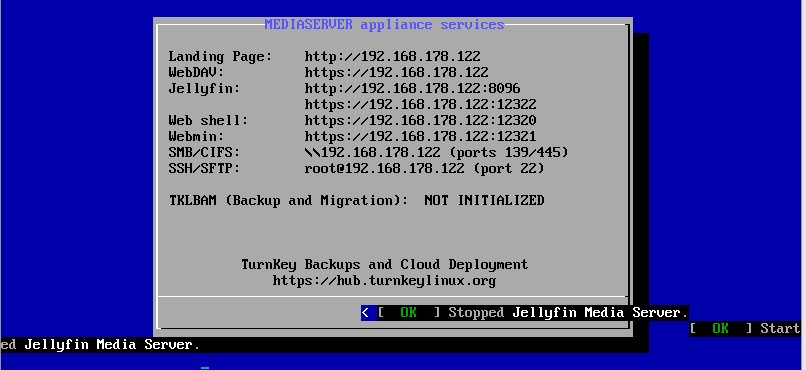
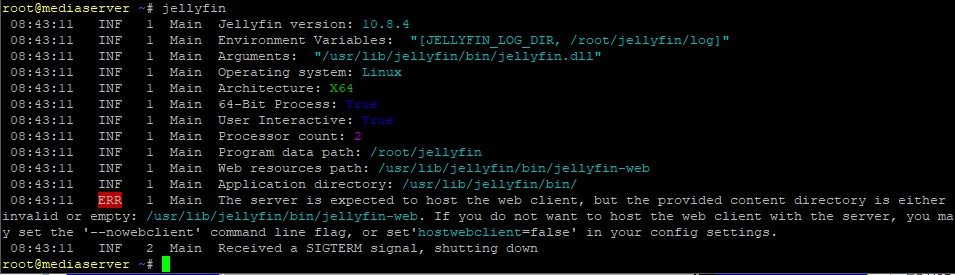
Then I logged In With Putty and Tried to start Jellyfin Result: Pls see Screenshot_putty_jellyfin.jpg
Also Webmin is not reachable
I powered off the server and restarted again but same result.
Pls help to get it running again
many THX
That is very strange!
I might start at the end of your post. The fact that Webmin is not working, as well as your noted Jellyfin issues, does suggest that there may be some serious system wide issue.
Where/how are you running your TurnKey Mediaserver? E.g. bare metal? VM? (sorry if you've already told me elsewhere). Ultimately, it shouldn't really matter where/how you have it running, but it may be useful info. If it's a bare metal install, then failing hardware is a possibility. It's also a possibility even if you are running a VM, although it's unlikely that there wouldn't be other issues noted (as physical hardware issues would likely also cause issues on the host).
Regardless, check to see if your root volume is mounted read only (a common sign of a failing HDD):
Judging from the output you shared, if it's still mounted read/write, that should return this:
If not, then it will be more like this:
Note the first 2 letters within the parenthases; 'rw' (read/write) or 'ro' (read-only).
one other thing to check is free disk space. I think it's probably unlikely that it's run out of free space, but perhaps?
I'd also be interested to see some more info about Webmin's status, as well as it's stunnel service:
It might also be useful to get the most recent (40) lines for both services from the journal:
Moving back to the top of your post and Jellyfin specifically, your first screenshot shows that something caused Jellyfin to stop (well restart strictly speaking).
Hopefully you might be able to determine why by running this:
Then scroll through the output until you find that event. Ideally copy/paste the relevant lines into a new post (please include a few lines on either side of the restart).
If you have an idea of when the issue was, you can specify the Journal timeframe that you want to view. E.g.:
Or with between times/dates:
Once you've worked out the timeframe that the restart occurred, if the Jellyfin journal itself doesn't provide enough info, it might be worth checking what else was happening on your system around that time. So rerun the 'journalctl' command, but this time, use the '--since' and '--until' switches to limit the timeframe to say 2 minutes either side of the Jellyfin restart timestamp. E.g. assuming that the "Jellyfin stop" occurred at 2022-09-02 19:17:10, try something like this:
Please post back that info and I'll try to give you a hand decoding what went wrong.
Last thing: please note, that unless you have set the timezone of your server, the times shown by the journal will be in UTC.
Moving on to your second screenshot, that suggests that either /usr/lib/jellyfin/bin/jellyfin-web doesn't exist. Or if it does, it's not in the expected format. Or perhaps Jellyfin doesn't have permission to access it now?
First step is probably to have a look what is going on with that path. I suggest simply listing it:
I assume that that path is provided by the 'jellyfin-web' package. So double check that is still installed (and which version if so):