When wanting to add a directory in the shared resource I get this error:
COULD NOT CREATE FOLDER 'data55' (No such file or directory)
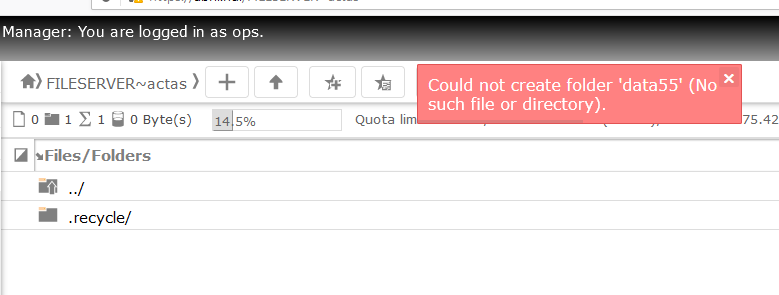
I have no problems with Samba. In Windows I can add directories.
User and group have full permission.
What am I doing wrong?
Replies (5)
Thank!
Reply 1Doesn't look like you are doing anything wrong...
Reply 2I just double checked and you are right. I can reproduce the issue quite easily, even with the 'root' user account.
I did discover a bug in the inithook, but fixing that didn't seem to change the problem.
Despite the message shown within WebDAV-CGI, it actually appears to be a permission issue. If I connect to the fileserver via WebDAV, then the issue can be demonstrated there too, but it gives a more useful error message. It first says that it doesn't have permission, (I assume it doesn't have permission to create the directory?) before it fails because the new dir isn't there (I assume that is when it tries to display the new folder). Here are the relevant lines from the log:
"OPTIONS / HTTP/1.1" 200 1260 "-" "gvfs/1.38.1"
"PROPFIND / HTTP/1.1" 207 921 "-" "gvfs/1.38.1"
"PROPFIND / HTTP/1.1" 207 1190 "-" "gvfs/1.38.1"
"PROPFIND / HTTP/1.1" 207 846 "-" "gvfs/1.38.1"
"PROPFIND / HTTP/1.1" 207 1190 "-" "gvfs/1.38.1"
"PROPFIND / HTTP/1.1" 207 3027 "-" "gvfs/1.38.1"
"PROPFIND / HTTP/1.1" 207 1190 "-" "gvfs/1.38.1"
"PROPFIND /FILESERVER~storage HTTP/1.1" 207 1224 "-" "gvfs/1.38.1"
"PROPFIND /FILESERVER~storage/ HTTP/1.1" 207 3424 "-" "gvfs/1.38.1"
"PROPFIND /FILESERVER~storage HTTP/1.1" 207 1224 "-" "gvfs/1.38.1"
"PROPFIND /FILESERVER~storage HTTP/1.1" 207 1224 "-" "gvfs/1.38.1"
"PROPFIND /FILESERVER~storage HTTP/1.1" 207 1224 "-" "gvfs/1.38.1"
"PROPFIND /FILESERVER~storage HTTP/1.1" 207 883 "-" "gvfs/1.38.1"
"MKCOL /FILESERVER~storage/another-new/ HTTP/1.1" 403 1059 "-" "gvfs/1.38.1"
"PROPFIND /FILESERVER~storage/another-new HTTP/1.1" 404 529 "-" "gvfs/1.38.1"
Notice the 403 error ("Forbidden").
Unfortunately though, after spending a few hours on this issue today, I don't have a solution. I am in the process of reaching out to the developer to see if he can help out and whether it's actually a bug in WebDAV-CGI, or something in the config/setup that we're overlooking. TBH, I feel fairly confident that it's not something we're doing, but I can be sure yet...
Excellent, thanks Dan!
Reply 3Thanks so much for getting back to us Dan! :)
I will test ASAP and let you know how I go.
(@Alfredo - Dan is the developer of WebDAV-CGI and I reached out to him via email).
Thank!!!!!
Reply 4You are The Best!!!
That did the trick! Thanks again Dan! :)
Reply 5I can 100% confirm that your fix worked beautifully. Thanks again Dan! :)
@Alfredo - I will include this in the new v16.1 release (that should hopefully be available soon) but if you follow Dan's instructions, that should fix it for you too! :)
Ok Jeremy!
I will be careful!