Forum archive
Booting TKL iso from multi-boot USB stick
I am banging my head against a wall. I hope someone here can help me.
I have an install of Ubuntu on a USB stick and modified the grub configuration to load other live and small systems (like Kali, SystemRescueCd, DBAN and Spinrite). I would like to add Bitkey to the list but fail in that effort. Bitkey (https://bitkey.io) is a side project that is built with TurnKey Linux and to eleminate Bitkey as the problem, I tried it with another (small) TurnKey system, i.e. OpenVPN and the same issue is present with that.
If I try to boot the TurnKey iso content, initrd loads but loops on "calling test-builtin" for quite a while and then fails with not being able to find a medium containing a live file system (see the linked screen dump where I tried it on a VM with Ubuntu Xenial installed and /boot/grub/grub.cfg modified to boot the OpenVPN TKL image).
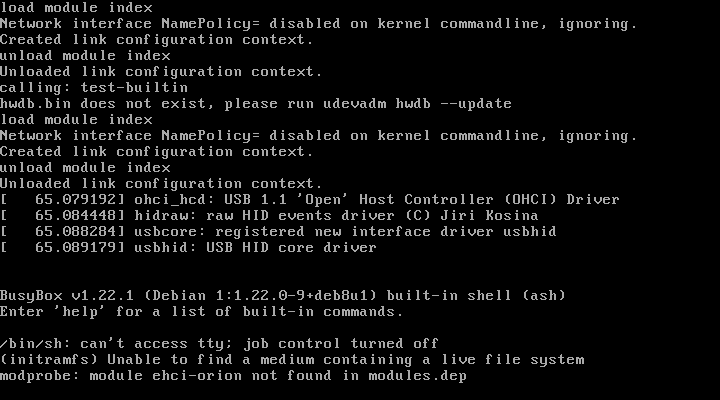
I tried booting in three different ways: the files from the iso images copied to a separate ext4 partition, booting from the iso itself as a loopback grub device and copying the iso image content to the file system that contains grub. All fail in the exact same way. I tries another casper based live filesystem (i.e. Lubuntu, files copied to its owf filesystem) and that one boots fine and finds the live filesystem to load.
For completeness, here are the modifications that I applied to grub by adding it to Ubuntu's /etc/grub.d/40_custom file and regenerating grub.cnf:
#menuentry "Bitkey" {
# search --no-floppy --fs-uuid --set=root 256c3939-1dc2-4e6b-8c94-2c57238a184f
# loopback loop /bitkey-14.2.0-community-1.12.iso
# linux (loop)/casper/vmlinuz boot=casper root=/dev/ram rw showmounts toram bitkey=cold-offline --
# initrd (loop)/casper/initrd.gz
#}
menuentry "TKL on Ubuntu /boot" {
linux /casper/vmlinuz boot=casper initrd=/casper/initrd.gz root=/dev/ram rw showmounts net.ifnames=0 --
initrd /casper/initrd.gz
}
menuentry "TKL on own partition" {
search --no-floppy --fs-uuid --set=root 2bee242a-b271-435d-b620-217a9b47a658
linux /casper/vmlinuz boot=casper initrd=/casper/initrd.gz root=/dev/ram rw showmounts net.ifnames=0 --
initrd /casper/initrd.gz
}
menuentry "TKL via iso loopback" {
search --no-floppy --fs-uuid --set=root 256c3939-1dc2-4e6b-8c94-2c57238a184f
loopback loop /turnkey-openvpn-15.1-stretch-amd64.iso
linux (loop)/casper/vmlinuz boot=casper initrd=/casper/initrd.gz root=/dev/ram rw showmounts net.ifnames=0 --
initrd (loop)/casper/initrd.gz
}
menuentry "Lubuntu" {
search --no-floppy --fs-uuid --set=root 256c3939-1dc2-4e6b-8c94-2c57238a184f
linux /casper/vmlinuz file=/cdrom/preseed/lubuntu.seed boot=casper quiet splash ---
initrd /casper/initrd
}
Does anyone have an idea how to accomplish this?
Thank you, you've at least given me a direction to look into. If I succeed I'll blog a howto.
Regards,
Rob