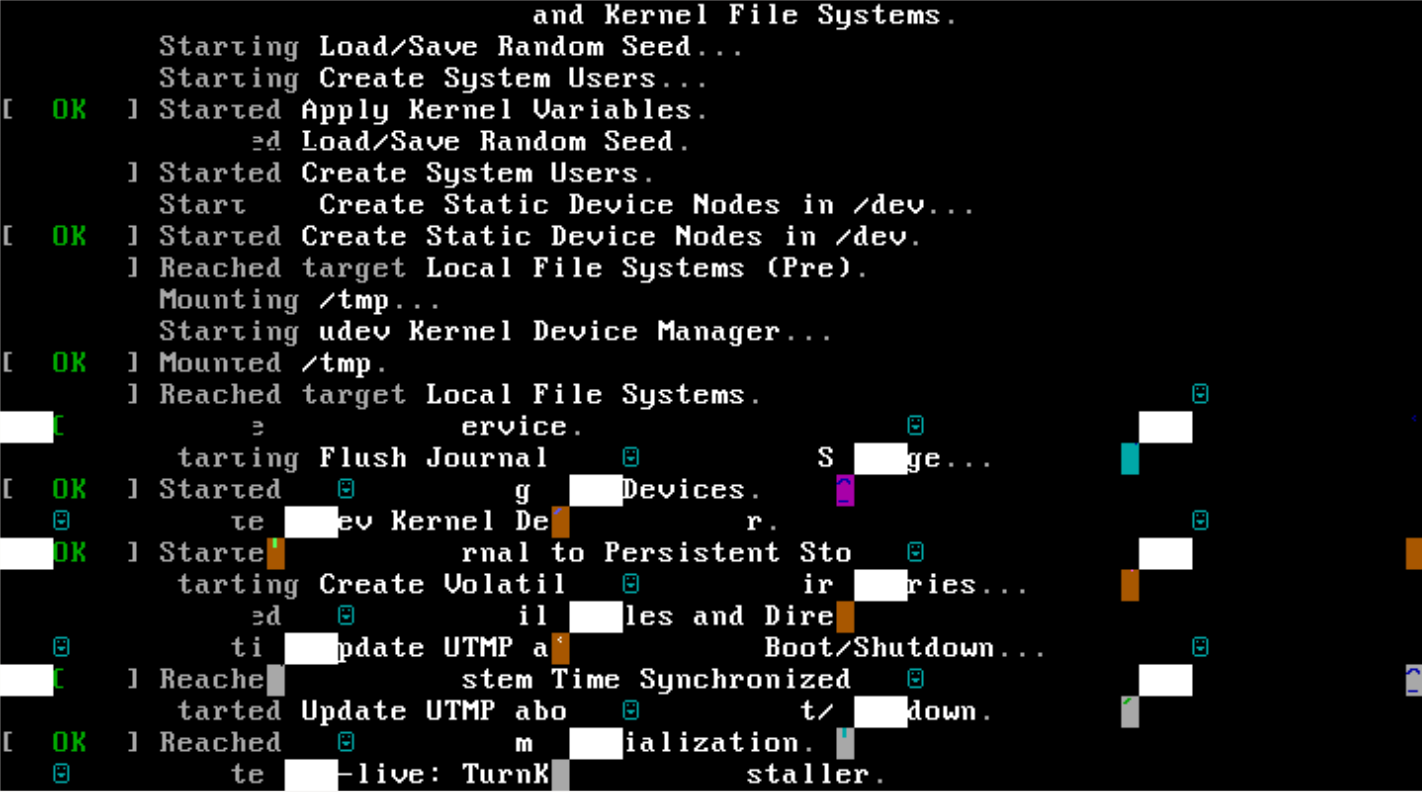
That is the glorious result when trying to install Mayan on a KVM VM. Reproducible, tried various CPU configs (host, kvm64). Machine hangs there, needs reset.
Replies (9)
When launching as LIve system
Reply 1Did you check that the ISO wasn't corrupted?
Reply 2I just downloaded the ISO via the website and it worked fine?! Did you double check that your ISO is not corrupted by checking against the hashfile? Considering that you can reproduce the issue (I assume with the same ISO) is because it's corrupted. If you redownloaded and still got the same result, perhaps one of the mirrors has a corrupt image on it?
It is a bit weird that it booted into "live" mode ok but not "install" mode. FWIW "install" mode is the same as "live" mode except none of the default services start. It stops all default services from starting by triggering systemd's "rescue mode" and making di-live (our installer) the only service that runs.
My guess is that if you continued to boot into "live" mode, then you'd quite likely hit issues if you tried to install. My guess is that is the bit that's corrupted in your ISO.
FWIW I tested on QEMU-KVM v3.0.1
Hmm, very weird?!?
Reply 3I need to update my Proxmox anyway, so I'll do that ASAP and retry to recreate your experience.
I assume from your other posts, that you haven't hit this same issue with other TurnKey ISOs - only Mayan? I wonder why that is? Other than corruption (either on your end or ours - which my experience and your hash report appear to be ruling out) there shouldn't be anything specific about the Mayan-EDMS ISO that should cause an issue that early in the process only on that one. (Beyond corruption) I would expect an issue such as that to either be intermittent and/or consistent across other ISOs too. So I wonder what the cause might be?! TBH I'm a bit stumped...
Tested here on qemu-kvm
Reply 4Tested here on qemu-kvm/stable,stable 1:3.1+dfsg-8+deb10u5 amd64 (on Proxmox 6.2-10)
# sha256sum turnkey-mayan-edms-16.0-buster-amd64.iso
54ce7f16ea39fbd1390adf9de7f5401b0a8d0041bc9773bea5137c9e099da20f turnkey-mayan-edms-16.0-buster-amd64.iso
Looks
ok.
Same with TK Nextcloud 16.0
Reply 5I wanted to upload a pic and it looks exactly as the one posted above, so...
Could the problem be the SPICE graphic console defined for the VM in Proxmox?
Ah ha! Great detective work!
Reply 6Ah ha! Great detective work!
I've got zero experience with SPICE so I've just done a bit of reading and it seems that for SPICE to render properly (using default option) requires qxl video drivers. And it seems that they're packaged as part of Xorg (aka X11). TurnKey doesn't include Xorg because it's not required for a headless (terminal only) server; just for desktop UI.
Out of interest, are you connecting via some third party software that leverages the SPICE protocol? Or are you using the Proxmox WebUI? FWIW I've always just used the NoVNC terminal in Proxmox webUI when installing and my experience is that it "just works". Once I've done the install, then I connect to my server direct via SSH. I'm a Linux user so it's preinstalled as part of my native terminal - same applies to OSX users. Most Windows users tend to use 3rd party GUI clients such as PuTTY or WinSCP; but as of a couple of years ago, even Windows has an SSH terminal client (but it does need to be installed/enabled).
And indeed - if I choose e.g.
Reply 7And indeed - if I choose e.g. "VMWare compatible" display, the problem doesn't appear.
SPICE (qxl) causes the reported problem.
Interesting. I wonder why your Proxmox default to SPICE?
Reply 8FWIW when I click "Console" in Proxmox, it defaults to "NoVNC" and that "just works". It's the default option for my old Proxmox server (which started life as v2.x IIRC; recently upgraded to v6.x) as well as a recent fresh install of v6.x (on other hardware).
Hmmm, strange that you haven't hit it with other Debian/Ubuntu headless VMs?! Your note sent me off for a bit more reading and it seems that there are in fact 2 different drivers! There's a kernel module (which should be included with the kernel - called qxl.ko) which should be loaded automatically if/when needed. And the Xorg module that I noted before (only required for desktop usage). So I'm back to not understanding what might be going on with SPICE...
And actually, digging in a little deeper, I just realised that not only do VMs on both of the PVE machines I have access to default to NoVNC, both of them actually have SPICE (and xterm.js) greyed out (so I can't select it even if I wanted to). If I stop them and change the display hardware to "SPICE", then the option is available. Out of interest, I did stop a VM, changed the display to "SPICE" and rebooted. Now when I select "SPICE" it just gives me a file to download?! I assume that is essentially some sort of config file for a SPICE client but I don't have one handy to check.
The LXC containers have all 3 options available, but as per above, when I select "SPICE" it just gives me a file to download. As it's an LXC appliance though, and doesn't have it's own kernel, I checked the PVE host and turns out that the qxl kernel module isn't loaded by default.
I'm not sure whether you are interested in digging in any further with this now you have a few workarounds (setting "VMWare compatible" display, using NoVNC via browser and/or SSH)? Perhaps you're happy to leave it be...?
If you are interested in digging in a little more, then you can check to make sure that you have the kernel module for your current kernel:
uname -r
find /lib/modules -type f -name qxl.ko
My PVE confirms that there is a relevant module for my kernel (this will look different on TurnKey as it'll have an older kernel, but it should have the module):
5.4.55-1-pve
/lib/modules/5.4.55-1-pve/kernel/drivers/gpu/drm/qxl/qxl.ko
To see if it's loaded try the below. If it returns nothing, then it's not:
lsmod | grep qxl
If the above returns nothing, you can try manually loading the module:
modprobe qxl && lsmod | grep qxl
On my PVE host I get the following output (showing that the qxl module is now loaded):
qxl                    61440  0
ttm                   106496  2 qxl,radeon
drm_kms_helper        184320  2 qxl,radeon
drm                   491520  5 drm_kms_helper,qxl,radeon,ttm
If I'm right (which I'm not 100% sure of TBH) then hopefully SPICE should now work. But as I say, I'm not set up to test it properly. I wonder if that changes things on your server? If it fixes the issue, you can permanently load that module (so it's reloaded next boot) by adding it the the /etc/modules file. I.e.:
echo qxl >> /etc/modules
If manually loading the qxl module doesn't help (or if it was already loaded) then I'm pretty much out of ideas...
I simply connected via the
Reply 9I simply connected via the Proxmox-integrated "console", which displays in the browser window.
So yes: Proxmox WebUI
In the other VMs I never installed any qxl drivers (Xorg) as I'm not using X there either and never encountered this problem. Only in TKL. ;-)
When launching as LIve system, this garbled picture above appears shortly, but the launch continues (and works, next screen is root password entry)