Forum archive
Server 2019 DC Samba DC Fail to Bind LDAP
Hi all,
I have set up a Windows Server 2019 Primary Domain Controller on my test network. I ran through and resolved all of the issues found with DCDiag and the Best Practices Analyzer. The DC is discoverable on my network. On the 2019 DC I ran ldp.exe and successfully connected both with and without SSL. At first, I was not able to perform a "simple bind" until I read that I needed to append the username with @domain.tld (see attached image). Once I did that, I no longer received the error. I also found that I can successfully bind with no credentials - anonymously.
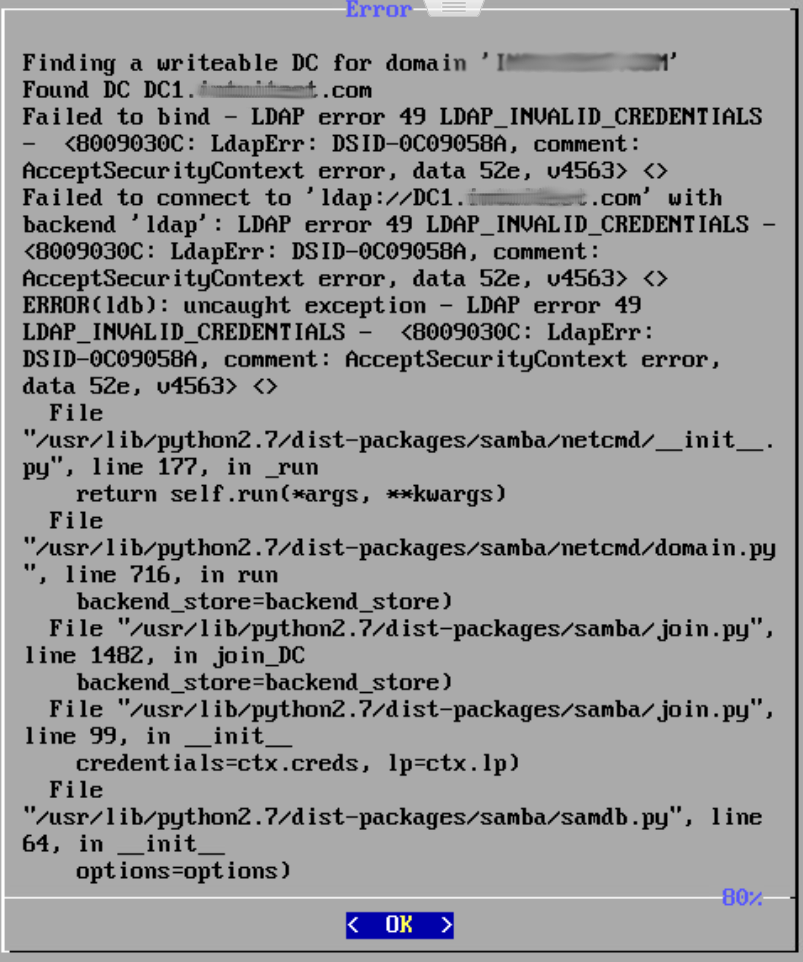
I booted up the Turnkey Domain Controller that was downloaded a few days ago, entered the root password, realm, NetBIOS name and Administrator password and hit OK. I was promptly presented with an error (see attahced image). The message stated that it found my DC but "Failed to bind - LDAP error 49 LDAP_INVALID_Credentials...". I assure you, they are not. Since there is no way for me to do append the username with the domain during the TK DC installation, how do I join it to my domain? Do I create a "new" domain and then demote it, or is there something else I should be doing? The only other option I can think of is to do a clean install using Debian/Ubuntu server and follow the instructions at Samba.org to join a Windows DC. I'd rather just boot up the TK DC. I've been researching this for about 16 hours now and have come up dry. Any help is greatly appreciated.
Thank you,
Troy


If you choose "2012" schema (i.e. not "2012r2") then you should definitely be fine (and at the very least rule that out as the issue). AFAIK, even using the "2021r2" schema should be fine as far as the basics go.
Whilst the set up is relatively straight forward, there are a few details that have nuance (and different options that may apply in different scenarios). Although really the basics of joining, should mostly "just work" I would expect.
If you continue to have issues, then I suggest consulting the experts over on the samba@lists.samba.org mailing list. Hopefully someone there might be able to help out?
If you do that, please be aware that (as I've likely mentioned) TurnKey (v16.x) is based on Debian (10/Buster) and has Samba v4.9 (installed from Debian repos). if you're not already, be sure to nuke the previous config before retrying. Assuming that you're doing that, then you should be using default Debian config. Regarding Samba specifically, we provide some "addons" (webmin module - that has limited value with AD; and our setup scripts which didn't work for you anyway...),s o clean CLI config should be same as if you were using vanilla Debian.