
From the project
New Hub feature: Auto-Restore TKLBAM backup to a new cloud server
Since we announced the release of TurnKey Hub v1.0 two weeks ago, we followed up with the two top issues users reported, and continued to receive awesome feedback - you guys rock, keep it coming!
A common question we received was related to restoring a backup to a new server. This wasn't a new question either, last year Phil Bower said: "I only want to run my instances while I'm using them so I'm interested in figuring out the fastest way to create new instances and restore backups to them."
In light of this, we just released a new Hub feature that streamlines the restore process depending on your use case. It also makes testing your backups even easier!
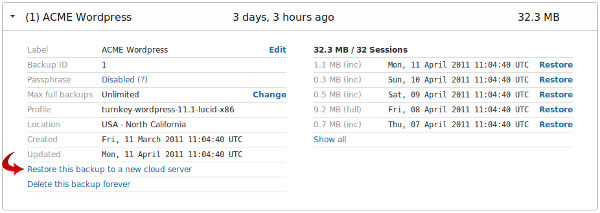
Restore this backup to a new cloud server
Alice is a consultant developing a new site for her client on Turnkey Wordpress in a local virtual machine. She is regularly backing up her work with TKLBAM and has reached version 1.0 status - time for production.
Alice logs into her Hub account, goes to the backup dashboard and clicks "Restore this backup to a new cloud server". The Hub knows which appliance is related to her backup and launches a Wordpress instance. TKLBAM is automatically initialized and her backup is restored, essentially migrating her local VM to the cloud.
Alice jumps up and down with excitement. She immediately calls up her client to give them the great news. Development to production in 3 minutes flat!
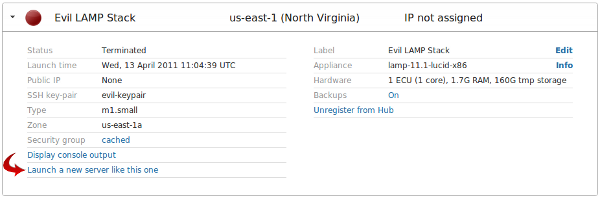
Launch a new server like this one
Bob (aka Evil Bob) has a highly customized TurnKey LAMP instance running in the cloud. He has added user accounts, installed packages, saved data on the filesystem as well as MySQL. Additionally, he configured an EBS volume and Elastic IP when he launched the instance. He even customized the firewall rules.
Bob only needs the instance to be up about for a few days every week while crunching data for his evil plan, but launching a new instance, attaching the EBS, associating the EIP, tweaking the firewall rules and manually restoring his TKLBAM backup is a little tedious.
Tedious? Not any more! Once a week Bob logs into his Hub account, goes to the server dashboard and clicks "Launch a new server like this one". He clicks the checkbox to automatically restore his backup, and he's off! The Hub launches a new server, automatically attaches his EBS volume (EBSMount mounts it), associates his Elastic IP, configures his custom firewall rules and restores his backup.
The lights dimm, Evil Bob's face lights up, raises his chin and lets out an evil laugh - MUHAHA!!
Note: The new restore features are not available for passphrase protected backups or legacy builds.
PS: sorry for the late response. It's been holiday season over here.