I've been struggling to set up a PDC in the AWS cloud. I've got the turnkey appliance up and running but I can't see any docs on how to connect a Windows server to it.
I have set up a record in Route53 for the domain:
SRV record for _ldap._tcp.dc._msdcs.mydomain.tv: 1 1 389 54.226.208.189
When I set the windows domain to the same domain I've set up on the PDC I get this error:
DNS was successfully queried for the service location (SRV) resource record used to locate an Active Directory Domain Controller for domain insm.tv:
New to my VM and did a reboot per the heartbleed recommendation.
After the reboot the dashboard says everything is ok but web management, web shell and all links to my application aren't connecting. Not sure what I'm supposed to do as I would think the application would be down but I could still access the OS.
Does anyone have any experience getting TurnkeyLinux templates to work for OnApp + KVM? What is the process needed for this to happen?
Is it possible to have a Debian 7 install, and installing the TurnkeyLinux appliance on top of of it? Then with OnApp make templates for each appliance?
Hello, I have an Owncloud server running but I need to change the domain to cloud.domain.net so in the web broswer i would type in http://cloud.domain.net:8080 and need to change the port number for the sync client so that in the client the address I would like to use is https://cloud.domain.net:4434. Keep in mind i'm not very good in Linux and am just learning it. Any help would be greatly appreciated. Thanks in advanced. Rob
I have installed turnkey phpnuke and all went well, but when I try to login to the admin page with the username and pw I created, it returns to the login page and does not login to the admin console. I have reinstalled several times, and also manually changed the password in myphpadmin.
I have been trying to increase the max upload size without any success. I have rwead several posts here and in other forums and tried all the recommendations. It comes to this: whatever change I do to the php.ini files (there is no .htaccess in my installation) has no effect whatsoever: the max upload size is 2M. Even setting upload off has no effect. It looks that this is either hard coded or there is another configuration file that I am not aware of.
I have just made my first domain on a Linux Debian TurnKey machine, and everything works fine. Though, I do have a question.
I have a storage folder on a NAS box (Storage device) and I want to share that folder to my domain users via Turnkey. Is there a way to mount that share to my Turnkey? And if there is, how can this be done?
I use a Buffalo LinkStation Nas, where I have also tried to connect it with the domain option, but this is not possible - But it works fine on clients and other host machines.
Everything seems to go fine on the server... but from my local client I cannot either pull or push to the repositories: I am asked for 'git' password... but giving its Unix password does not work.
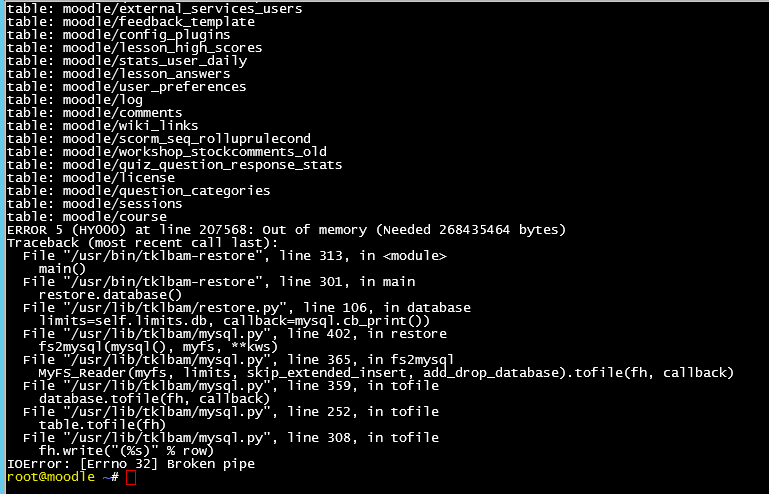
I'm having issues on restore a full backup, I have successfully completed using webshell --database. Appliance version 11.2. This to create a testbed to a live version already in place.
Every time I use --skip-files --skip-packages I get the following error? I have increased max allowed limit?
Anything else I could try? would appreciate any advise?