I have a question regarding storage space on instances launched via the Hub.
Lets say I want to launch an r3.large instance that comes with 32GB of SSD storage. When I go to the Laucnh New Server option at the Hub, at the very bottom in the Advanced section there is an option that says "Root file system size (GB)" and defaults to 20. Do I need to manually change that to 32 in order for my instance to utilize all 32GB of SSD storage provided by Amazon? If I leave it at 20 will it launch with just 20 and leave the other 12 "wasted" so to speak?
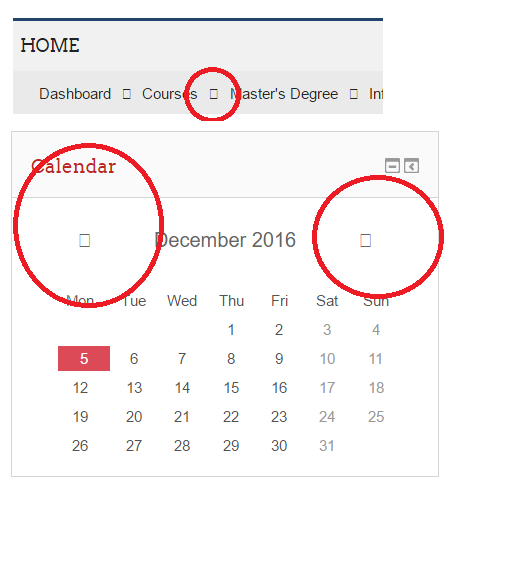
I deployed a Turnkey Moodle installation but I cannot manage to get the font-awesome icons working. They simply appear as a white empty square, as seen on atttached image.
I am completely new and I downloaded OVA template into ESX server. I would like to add into virtual machine new HDD where exclusively I would like to store data.
Hi, I'm putting together a basic home backup server and trying to decide on hardware, and coming up to some compatibility confusion.
It seems that most hardware compatibility lists I've found in the Debian documentation and elsewhere online are badly outdated, so my question simplified is, which motherboard should I use?
I have TurnKey WordPress installed (wheezy) and one of the plugins requires that I have cURL 7.30. Currently cURL 7.26.0 is installed. Is it ok to upgradt to 7.30? Thank you.
I have installed the latest PostgreSQL - Advanced Object-relational Database System. From the console I can set the DHCP or Static IP address. I can then ping and access the appliance. After reboot I can no longer ping or access the appliance. After resetting the DHCP or Static IP address at the console, I can again access the appliance.
I have recently begun coding an application on Android Studio, I followed a number of tutorials for creating login and registration pages. I set up the TKL mysql server and have been trying to access it from the Android emulators but I seem to be getting the same error over and over again. From what I gather it is to do with the Certificate Authorities for the server. If anyone has a solution to this it would be much appreciated as I am new to the networking side of things and haven't got much experience.
I just downloaded the VM of the Trac appliance (version 14.1) and installed it on our vsphere. This worked fine. The server is running and I can access webmin.
However every HTTP or HTTPS call to the IP address returned an internal server error.
I could track this error down to /var/www/index.html
This file contained two additional lines after the closing html tag, which rendered it invalid and led to an error message "TemplateSyntaxError: junk after document element: line".
After I manually deleted those additional lines, trac started to work...
I supplied all the values as per the documentation, but the when I start up the image I am still asked for email for "System notifications and Critical Security Updates". What is the value I need to preseed for that? What do I put if I want to skip?