i want to just download the tarballs and run them on a fresh jessie install. what special configs do i need to set up differently that if i just run a standard template from the -download option?
i downloaded one and ran it with a config based on my other containers. it runs but i know that TKL appliances are capable of a lot more automation and preseeding than vanilla templates.
i tried the lxc-template but it throws errors. i would rather use that approach and maybe i should paste the error in here?
So I've been running the standard moodle setup as per your settings on a medium moodle setup/instance.
I got an email from Amazon last month saying that the server was hacked and used in a DDoS attack. They closed the port in question (port 80) and I didn't really see how it was possible based on your security etc. So i left the server open and monitored it (since we needed moodle.
But then I got a bill for $2500 (AUD) for the server hosting last Friday. I stopped the instance immediately.
When I run apt-get on Turnkey 13 Moodle I get the following errors:
W: There is no public key available for the following key IDs:
9D6D8F6BC857C906
W: There is no public key available for the following key IDs:
7638D0442B90D010
Is this an issue? Does it have something to do with apt-get having the wrong public key?
Does anyone store their server configuration in git? It seems to me it would be a good way to keep a history of changes made to a server.
There are a few things I'm concerned about however;
What files to include:
- /etc seems like a pretty obvious place to start, as most applications keep their configuration in there, (but of course not all applications).
- /var/www (if applicable)
Software updates and such seem as though they could be handled by apt-get or some similar package update tool.
I'm a CAnvas newcomer . I have just installed turnkey canvas 14 . It seems all working properly but email..
So when we invite users , seems no email received by user
Another info is I'm using postfix as mta to another smtp server . Email is working when we send email through command line .. The outgoing_mail.yml is already set to the smtp server ip address .
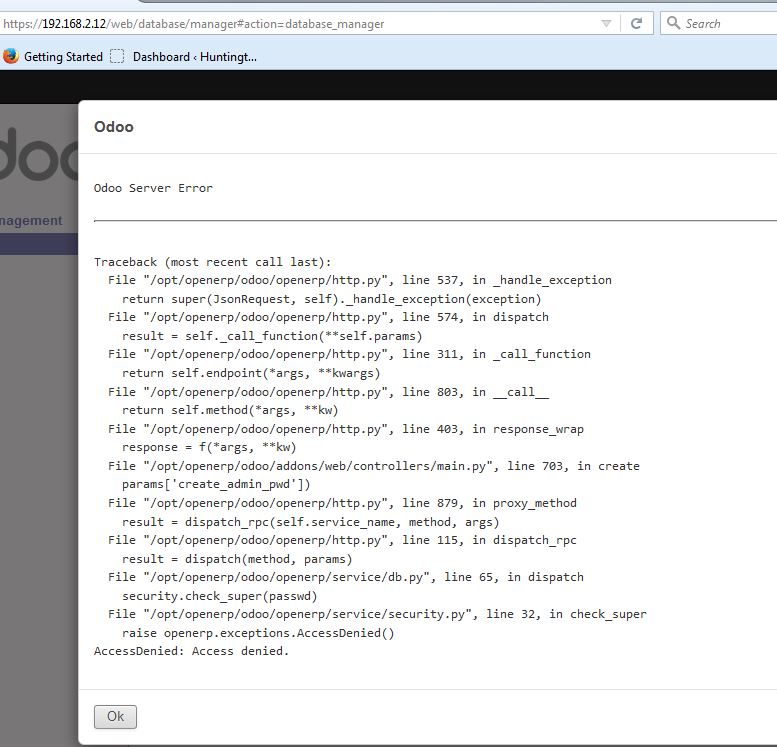
Tried the oDoo appliance in both the VM and ISO versions in VirtualBox. Couldn't get either to accept the initial "create oDoo database" wizard. Attached is a snapshot of the error.
I deployed the ova template of the latest turnkey-gitlab and everything was working fine. If we leave it for some time (possibly overnight) then when accessing the site we receive 502 Bad Gateway. Running with 4Gb RAM and most issues i have seen relate to memory issues when runngin with 512MB or 1GB RAM so not sure this would be the issue.
Anyone experienced this with the latest version and could possibly shed some light?
We're upgrading our Moodle server which Moodle 2.5 and isn't TurnKey to the TurnKey Moodle Appliance; but the TurnKey Moodle Appliance is at an older Moodle version than the Moodle version of our current server (Moodle 2.4).
So if I upgrade this Moodle Appliance to 2.9, the only way to do that is to upgrade it manually correct?
And I won't hurt the upgrade functionality if I do that correct? Because it obviously doesn't auto upgrade Moodle; it only updates debian and the stack correct?