I'm using a Turnkey Core box as a basis for an install of apt-cacher-ng ... updated the DHCP server on my router to give it a static lease (give it a predetermined IP), but instead something is telling udhcpc to send a 'select' for its prior address.
I have searched high and low online and on the system itself to find where udhcpc and/or ifupdown and/or whatever handles network configuration on TKL Core is storing the data about the prior lease (including the old IP which it subsequently requests) and I can't find it.
I have server with installed ProxMox 7.1-10 and maked CT from template debian-10-turnkey-openvpn_16.1-1_amd64.tar.gz. The server has 4 IP's, configured PREROUTING and POSTROUTING nat rules for translate network from vmbr0 to vmbr1 and reverse.
I have been trying to get the Standalone Tomcat v16.1 to work with a certificate. Following instructions from this post Confconsole - Let's Encrypt | TurnKey GNU/Linux (turnkeylinux.org). I can generate the certificates and they are going into the /etc/ssl/private ok. I get the Python port 80 but stop add-water.
When I go to test.bakery.co.uk it says Not secure.
How do I get Tomcat to use the cert using the method.
I've been using TKL images in virtualbox for years now. I recently decided to explore running in a docker container instead. I'm very new to docker and container virtualization so please forgive any misunderstandings there!
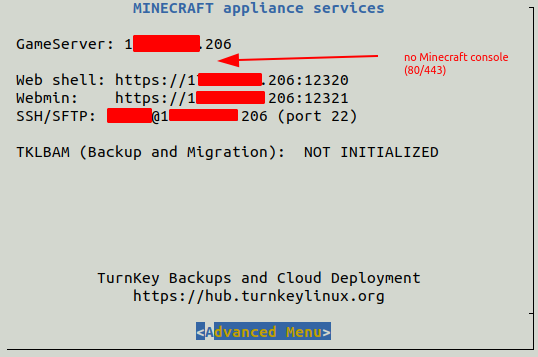
I dont knew how to access Minecraft admin panel.
I found on some pages that i should access it via HTTP or HTTPS standard ports, but my sarver don't have that ports opened.
netstat -tnlpu
Active Internet connections (only servers)
Proto Recv-Q Send-Q Local Address Foreign Address State PID/Program name
tcp 0 0 127.0.0.1:10000 0.0.0.0:* LISTEN 2172/perl
tcp 0 0 0.0.0.0:22 0.0.0.0:* LISTEN 231/sshd