Just installed the lucid samba appliance as a bare metal install ( my virtual machine knowlede using virtualbox produced too slow a result...). Its working well.
I wrote a simple bash script to do a nightly back up and email me the output, after installing mutt and msmtp to the appliance (by the way msmtp appears by far the easiest MTA to install and configure for simple tasks like this).
tklbam-backup | mutt -s "Daily Backup Report" <my email> is the key line in the script
The script is owned by root and has rwx permissions.
I've been experimenting with Proxmox VE, and I've installed the Turnkey domain controller (Hardy version) as an OVZ container. Normally I use Virtual box, and after importing the appliance I start it, it shows me the configuration menu, and away I go.
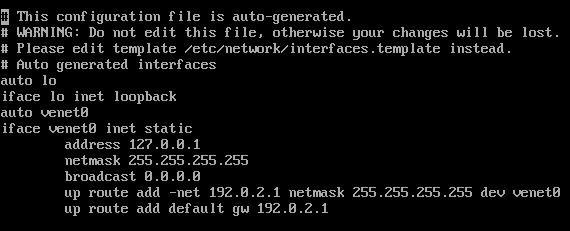
With PVE, it doesn't seem so simple. While it's running, I open the console of the appliance and all I get is:
I'm new to linux and have been trying to update openssh server but it says it already has the newest version. I'm using the LAMP appliance Is it possible to update this on my server?
Second, the question. What is the best practice to ensure an appliance is powered on and configured with the optimal security (just concerning accounts, at the moment). I'm looking/preping a fileserver appliance for PRODUCTION deployment and am a just trying to see if there are any documents, links, blogs or anything related to an ideal secure deployment of said appliance. Currently you provide the "Default credentials" for all appliances, but i'm wondering if their are other accounts that I need to pay attention to?
I'm new to turnkey linux & love it so far. Though I haven't found much documentation on the file server appliance, that I just setup. Maybe I'm not looking in the right places. Anywho; our main purpose (for now) is to use the sftp service in & outside our organization. I have users setup & they can upload/download files.
1. How do I limit the users to upload/download & even browse their home directory only? (now they can browse / )
I'm close to finally going live my employer's new TKL Drupal 6 appliance on Amazon EC2 via the TurnKey Hub.
Everything with the TK Hub seems to be working great, but I decided to try a disaster recovery scenario and was disappointed by the result. I'm hoping that I'm simply missing something.
I'm currently using the Turnkey Wordpress appliance to build an intranet for a company. They saw the wordpress appliance server yesterday and wanted to change all of the ip addresses to a 192.168.0.x format. Any help would be appreciated.
P.S. I love this idea of delivering virtual servers to my clients. Thanks Turnkey!
I was wondering wether I can update my current Turnkey Trac appliance (ubuntu 8.04) to work on a more recent ubuntu release? If so, can I do it without loosing my current database and system configurations?
I recently started using Proxmox VE (Thanks JedMeister!) and I would like to use a few appliances as OpenVZ installations (for performance, and ability to use it without VT-x), but the process of turning an installation to an OpenVZ template seems overly complicated. Has anyone else done this?
As an aside, does anyone know of a comparison sheet between different virtual environments / hypervisor OS's? I'd like to have a more comprehensive idea of what's out there.