I am new to Linux and new to Turnkey. I like the concept very well.
I successfully installed some appliances from Turnkey but still have some fights with all the network options VirtualBox offers. Right now I can only access the appliances if I use NAT with forewarding of port 8080 to port 80. Then I use http://localhost:8080 under Vista to get access. Is there a way to give a name to the virtual machine that I can access it as http://servername:8080?
I recently had to move a Wordpress site from a corrupt VM to a known good one. In other words, I copied the Wordpress directory (via SFTP) from the corrupt VM and overwrote the existing Wordpress directory in the good VM. No doubt this was crude and lacking in elegance, but it worked fine, with one exception.
I am unable to update Wordpress. On other Turnkey Wordpress appliances, when I update Wordpress automatically, it does just that.
Hi, I'm new to the forums so please forgive me if I've posted this in the wrong area. We have recently brought up a PHPBB3 appliance in our enterprise. We have hit a bit of a snag and are hoping to resolve an issue. If an http request is made without a trailing slash, the server issues a 301 and sends relocate headers appending the trailing slash. This is expected behavior and works great as long as you use the actual host name or IP address of the server.
I am running the Joomla TKL app locally and I have linked it to our tunkey hub account and have successfully performed my frist backup - BTW:this is a crazy development advancement - what I call a 'game-changer!' :)
I have 2 questions -1. how is it that my first backup (initial) is only 2.1 MB in size when I've created a joomla-virtuemart site that is 380MB + in size - surely the initial backup routine backups up all the files that have been changed/added since the TKL application's creation - is not correct?
I have been developing a Joomla VirtueMart site on a mac and now would like to port it over to my TKL Joomla application machine. Due to terrible ViruteMart performance, it has been suggested to me that I look at tuning it performance through the use of various caching techniques. The formula I have been suggested is as follows:
Just discovered this distribution and so far absolutely love it. It works very well on my macbook whenever there's a network. But what if there's no internet connection? Would I still be able to reach it? Excuse me if I'm overlooking something completely obvious!
I am testing to see if i can access MySQL Data remotely with Navicat. They say you can get to it via SSH or HTTP... that said, I can't seem to get it to work.
I know on the Web-SSH it is port 12320. Evidently default SSH is 22. Which port should I specify in Navicat to get a DataTunnel going?
Right now I am trying to get to Magento Data but it could be any, including PostGRE on other appliances.
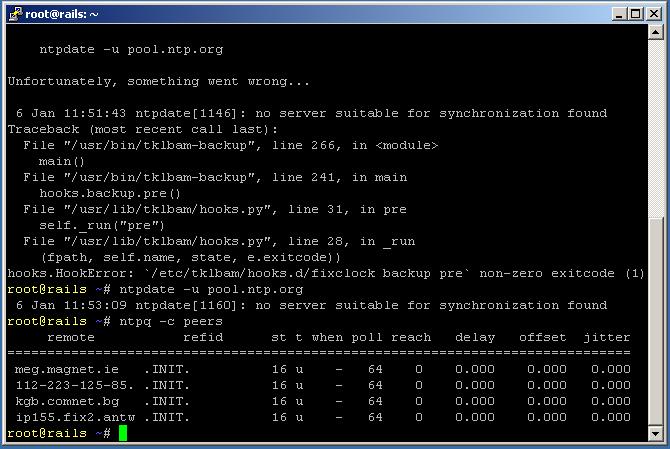
i'm trying to use tklbam. tklbam-init with key was done. after tklbam-backup is called an error is displayed, because of ntpdate errors. if i call ntpdate -u pool.ntp.org, the answer is always that not suitable server for synchronisation could be found. Any hint how to proceed beyond this point or avoid this error?
Info: turnkey-rails is running inside virtualbox. internet connection is available and working.