I've just installed the LAMP appliance (and S3 backup), and have been really impressed.
It would be very helpful for developers like me (who aren't strong sysadmins) to know which group(s) we need to add users to after completing the install. Of course, I don't want to give the root password out to anyone, but at the same time
Is it really as simple as adding users to the www-data group? Does that grant the user access beyond just the htdocs directory? Having a quickstart guide that covers this would be great!
I start by saying I enjoyed the lamp appliance until I started to using it. I downloaded the "lamp" (mysql/apache/php combination) then I needed to work with some files from my Winbox. So I looked for smb.conf file. Surprise!! No Samba!! I thought that I could do some old school installation so I downloaded the samba.tar.gz . When I autogen.sh it tells me autoconf is missing. I went an downloaded autoconf. When ./configure it tells me GNU M4 is missing... By this time my frustration reached the roof.
I installed turnkey a few days ago. Nice touch to have webmin, apache, php all installed. It basically all works.
There is just one problem that I can't get solved by myself: mysql should be accessible from outside the virtual machine into which I installed turnkey linux.
What I want to do ist:
# mysql 192.168.0.80 -u root -p
Enter password:
ERROR 1045 (28000): Access denied for user 'root'@'localhost'
I have been getting "Error 101 (net::ERR_CONNECTION_RESET): Unknown error." while trying to connecting to the Torrent server appliance. Web-GMUI and shell access working fine.
Tried everything, NAT, Firewall changes. couldn't figure out what the problem was.
Solution turned out to be simple. Use FireFox. I was using Chrome and IE, both gave me connection errors. With FireFox, it worked in an instant.
Spent 2 days figuring out the solution.. Hope this helps some poor soul.
I've set up and logged in as AdminUser and cannot create new webs on the new TWiki appliance. Had been using the "old" one for a couple of months with success. The new one is a fresh install. Any ideas? I get the following error message - not sure if it's related to the appliance, or TWiki itself.
"Access check on Main.WebHome failed. Action "CHANGE": access not allowed on root."
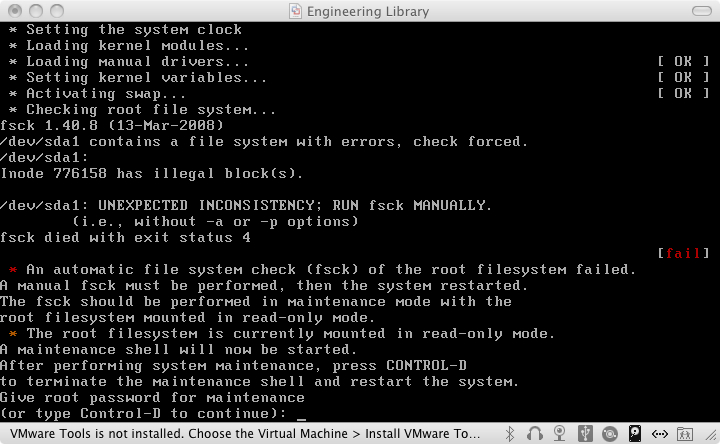
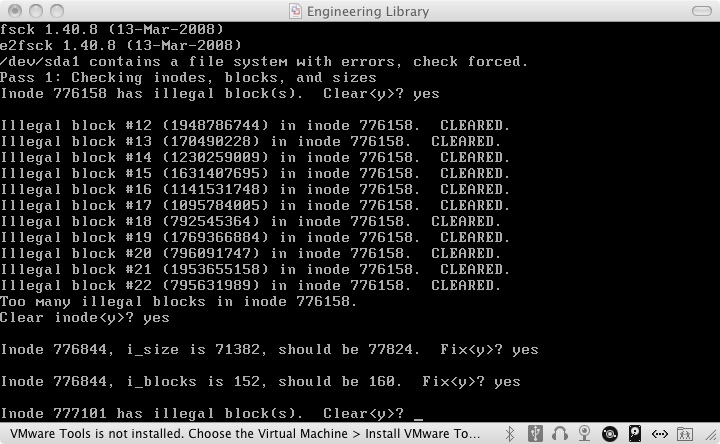
I have been using this Wordpress appliance for about a year. Recently, after I rebooted the appliance I got an error message saying "Inode 776158 has illegal blocks".
I am trying to set Apache as a reverse proxy. However I need to install Apache 2.2 and mod_proxy_html 3.1. Can you tell me which version are installed on Turnkey.