I've found a couple of issues with the Canvas appliance. How do I get in contact with the maintainers?
1) When clicking the edit button on assignments, the content disappears. I have to copy the content to the clipboard and paste the content into the editable assignments to preserve it.
2) When viewing discussions, the post divs along with the poster's name are visible but the content is missing.
Gagan here , I am very glad to found this TrunkeyLinux source . I just gone through your site i found good software packages . I am developing chat application for my social networking site , I am planning to use ejabberd XMPP server for develop real time web based chat application . I found XMPP chat module in your turnkeylinux ,I just downloaded iso image of that ejabberd xmpp chat and installed in virtualbox , When i try to create users for example.com in browser and i cant able to create .
So, I've got al-kitab.org's DNS going through TKL now, but the MX/A records I set up to redirect email service back to our old hosting account at Hostgator do not seem to be working: http://leafdns.com/index.cgi?testid=6B54BBCB
"Your nameservers did not return any MX records for your domain! This will cause mail servers to use the A record for al-kitab.org. as the mail exchanger."
Could anybody help me I'm getting desperate. I have installed the program as instructed and now it is asking for lamp login. I have checked these forums and it seems the Lamp Login is "root" I have tried this and it doesn't work. Anybody with any ideas please.
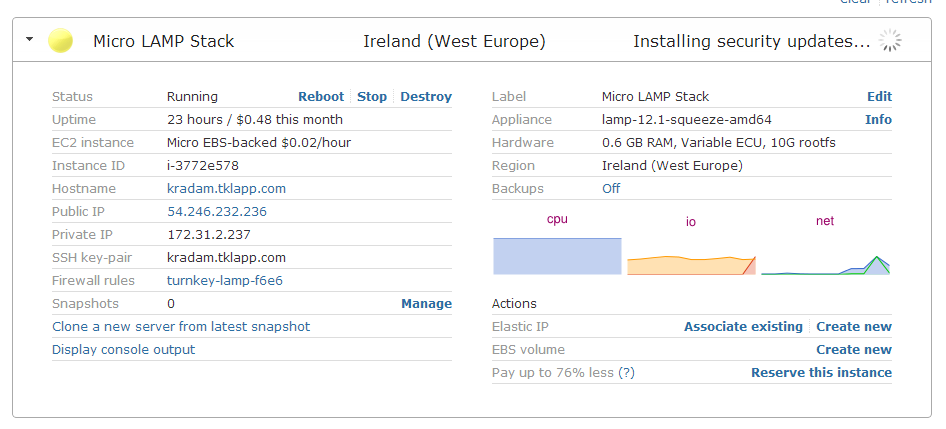
Yesterday I created Micro Lamp Stack in a hub, but I cant use this instance till now. During server launching I skipped option "Enable Turnkey on Amazon EC2", beacuse I wanted free evaluation. I'm not sure if I did well, there is little information about free evaluation. I'm not even sure I will be charged or not :).
The first problem is continous messsage about installing security updates. Maybe its important, maybe not - see attachment.
I knew I had a problem when there were only two reads tracked in the statistics, I have sent a large amount of emails via my marketing campaign and all have been suspended, although still being processed on the server.
The error recieved for each email is - "delivery temporarily suspended: connect to aspmx3.googlemail.com[74.125.25.26]:25: Connection timed out"
The server is being used to take the back up of an Application running on a Linux based server. The server took the backups correctly for around 2 months time & then I noticed that something went wrong as the Backup file size turned to 0 Bytes rather than around 900+ Mbs.
Was working on a project last week and went to log in again today to continue, but the Hub login is now throwing an error when I try to use my openID (either using myOpenID "aking" or openID "http://aking.myopenid.com/".
Error page says:
--
OpenID failure
An error occured with your OpenID. Please try Login or Sign up again.
I am accessing Fileserver from Japanese Windows PC with Japane keyboard.
There are some differences in key mapping with US keyboard.
Most of symbols I can type blind just on different key locations.
But unfortunately colon ":" can't be entered at all.
How can I fix the keyboard locale in Web Shell? It is desirable to make it browser language-dependent, because sometimes I use US machines to access console.
Can someone tell me how to reset the admin password for redmine turnkey 12.1.
I have the root passwords and can log into the webmin portal fine, but dont seem to be able to find how to reset the main admin user password, the email address was pointing at admin@example.com so unable to recover password.