A place to search for and ask for support

Alex Lee's picture

Fileserver appliance cannot change upload max filesize

Forum: 

Hello there,

I downloaded the latest Fileserver appliance the other day (September 12, 2012) and installed it.  When I try uploading files using the Ajaxplorer, the small upload window shows an upload limit of 16 M.

1) I have tried editing /etc/php5/cgi/php.ini, changing the post_max_size and upload_max_size values.  Doesn't work.

2) I read the documentation on Ajaxplorer and it tells me that it is not a limit imposed by it but PHP.

3) I have edited _every_ file with the name php.ini in it and still nothing.


Please help!  Thank you very much!

jpcuba's picture

hostgator or amazon ec2: for simple websites (wordpress) pros/cons

Forum: 

Hi, :) thank you all for creating this great website!

So.. I'm being hired for the first time to create a website and I'm being asked how much to charge... So since it is family I was straigth forward domain name 15$ and hosting 50-70$ a year. Now I'm trying to understand if it's better to use amazon ec2 or hostgator to host a simple website. When I googled this people were complaining that their sites were being taken down when they hosted videos and their sites used too much cpu. I guess my question is why not post the video in youtube :P 


Bjørn Otto Vasbotten's picture

Upgrading Gitlab

Forum: 

Question one:

Should I be messing with upgrading Gitlab myself, or should i just wait for TKL to do this for me? 


And if the answer to that is yes, then how do i go about upgrading...
I have some problems following the instructions posted on the gitlab site:

viper's picture

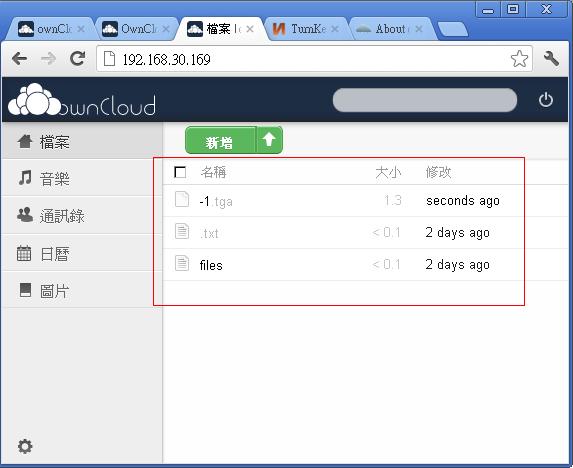
[Owncloud] File name with Chinese character didn't show

Forum: 
Tags: 
Attached: 

When uploading a file name with Chinese, owncloud only shows the extension name.

as the attached file

Randy's picture

LAPP Checksums

Forum: 

The md5 and sha1 checksums in the turnkey-lapp-12.0-squeeze-x86.iso.sig do not match those generated for the turnkey-lapp-12.0-squeeze-x86.iso file.

ElliotFriend's picture

OVF ID:95 Not Supported on ESXi 5

Forum: 
Tags: 

I've just downloaded the LAMP OVF to play with it. When I try to deploy it through vSphere, I get an error message stating:

The specified operating system identifier " (id: 95) is not supported on the selected host. It will be mapped to the following OS identifier: 'Other Linux (32-bit)'.

I've tried setting up a blank VM, exporting an OVF to compare the two files. From what I can tell, the two OS identifier fields are identical.

DirtyBirdNJ's picture

Extending VMDK Size

Forum: 
Tags: 

I am trying to get an application to work on the LAMP 12 appliance, and I'm running out of space because I need to load a particularly huge (13gb) database. I'm getting some errors about running out of space, and it finally clicked that the .vmdk I'm using is set to 20gb and I'm trying to use 26gb of space (.sql backup and then resultant database files).

AliMac's picture

Upgrades

Forum: 
Tags: 

Hi all


I'm new here and have installed tkl with canvas - it was a breeze, so thanks. One thing I unsure of is about updates. I have read that tkl updates every day but is this for the whole system (including canvas) or just the tkl core? If it is just the core, how do I update canvas? I have looked at the git hub canvas pages, and it implies that upgrading varies according to how the installation is done. Obviously, it doesn't mention via tkl.

Nick's picture

SSH Keys for TKL Revision Control (Git)

Forum: 

I've been going pretty strong with git but I still can't seem to figure out how to prevent it from asking for the password everytime I pull/push.  Everything I've read suggests that you need to copy the SSH key generated client side and put it into the ~/.ssh/authorized_keys file. 


However, my appliance only has a ~/.ssh file that reads:


ssh-keygen -f filename -C 'a comment' -N '' -t rsa -q


Greg Porter's picture

Moodle 2.3 TKL 12 clients > mixed content message after TKLBAM migration

Forum: 

I recently started the move from Moodle 1.9 to 2.3  Per my standard practice I built my proto-type using the TKL 12- Moodle iso in a virtual machine.    I then backed it up with TKLBAM and restored it to a new physical machine.    Everything seemed to go fine except --  clients are getting a mixed content message "contains both secure and nonsecure items"    I wondered if anyone has encountered anything like this?

To trouble shoot I am looking at:

1) restored differant server certificates - regenerate server certs

Pages