I'm confused about the Amazon pricing and am hoping that someone can clear it up for me. My understanding was that I can use the Turnkey Hub to deploy a Micro instance which will be free for a year, however when I go to launch a new server and choose Micro, it tells me I have to choose an EBS-backed server which costs $15/month. Why is this? What is the difference between an EBS-backed server and an S3? Will it still be free or do I actually have to pay $15/month?
I'm jumping in to the deep end here, and hope someone can provide step-by-step instructions for a novice.
Used VM and got everything to work nicely using Turnkey Lamp and Joomla! Akeeba backups of my site. So now I want to create my own joomla server. Assume I can start with the Lamp ISO on bare metal. Great, got it installed. I can log in to the machine (root), but now what? Where's my browser? First time building a machine from an ISO, have to start somewhere! Can someone please point me in the right direction? Thanks!
See Solution in bottom Reply: Lots of try's on a slow process.
I have been working through a TKLBAM-restore and having gotten a few limits to work I got further down the MYSQL list in Magento and got a different Pipe Broken situation.
I recently installed Turnkey Trac on a ESXI system running a few other (non-Turnkey) VMs. While the other VMs perform reasonably, the Trac VM is very slow. It takes 10 to 15 seconds to show a page after a click, which, according to my users, is un-usable.
I've gone so far as to completely delete the VM and re-download and re-deployt Turnkey Trac, with the same results. There even appears to be a delay on the command line, after a command is run for a few seconds.
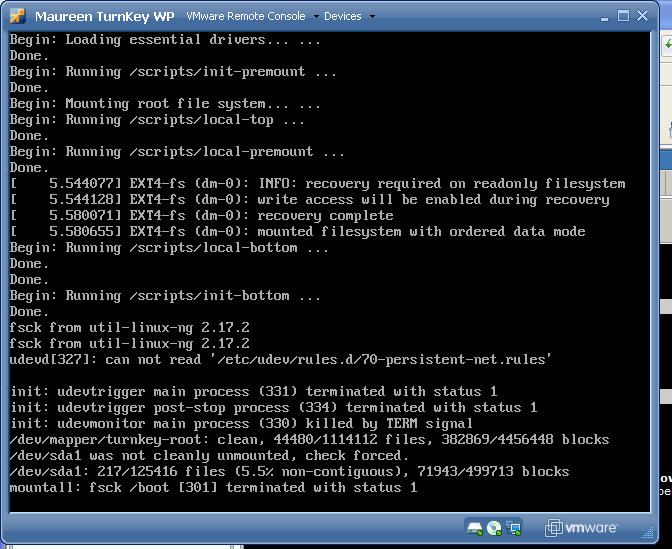
I have a working LAMP virtual machine. I can use it for as long as I want with no problems. However as soon as I reboot, the entire file system goes into read-only and I am unable to do anything.
I have a snapshot I keep reverting back to so I can continue using the machine, but no matter what, the next time I shutdown or reboot everything goes to read-only.
The only changes worth noting since the last snapshot (from a long time ago):
The small container offers 160GB of space > this is the same thing I see when I log into the webadmin console and check the sidebar. However I am very confused as to how much space is being provided.
Please forgive me if this has been addressed before. I could not find it anywhere in the forum.
I have been using the Wordpress Appliance for a while now to host our wordpress site and it works great. I would now like to add another wordpress site and would rather not not use wordpress multi-site. I would like to use another appliance. I don't want to have to use a seperate public IP for each appliance. What is the best prctice for this situation? If I'm off track, what is the best way to host multiple wordpress sites with the appliance?