The default Nextcloud image, when deployed, will include /index.php in the url. It took quite some time to figure out how to fix this, and I just wanted to share the solution for others. This should be maybe be the default for the Turnkey installation, or at least should be displayed in the Readme/Docs of the image.
I am rather new to the Turnkey appliances. I am looking to use one of the Bugzilla appliances to replace our old Bugzilla setup. It uses an old Linux OS and MYSQL, but separately. I am looking to import one of the DB backups from the current system into the new appliance, but am not sure where to import it in the appliance. Any guidance is much appreciated.
But back to my old in jinx appliance to the hub then created a new one using 15.1. I couldn't get the V16 appliance to install properly see my other post.
I then followed the instructions to update the confconsole which went okay and I restored all my certificates from the backup.
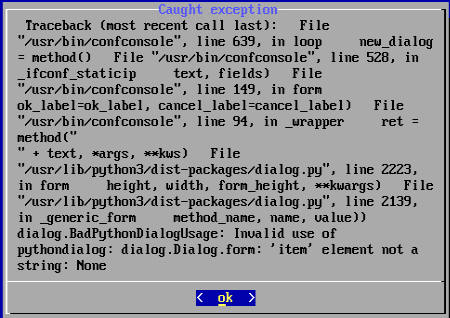
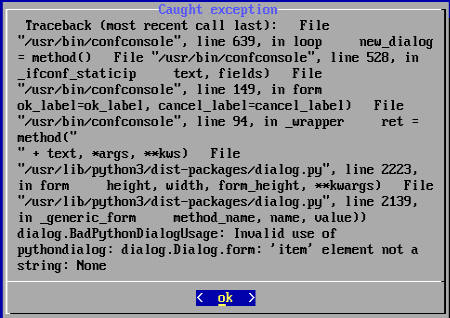
Trying to install a new nginx appliance to replace V14 as let's encrypt is out of date on the old version. I downloaded the v16 iso. I use hyper V. When you run the install you get to the stage reject CD-ROM FYI this doesn't work under hyper V. So you have to shut the machine down then eject the media. Restarting you get to the login prompt and I realise you can login and start the console. When I go to configure network I get error. Please see screenshot.
I use Turnkey's Wordpress VM. In WP I added a theme and treid to set up some pages. Now my WP crashes, when I try to work on a page.
Therefore I changed the following settings in my VirtualBox Manager:
RAM is set up to 2048 MB
Disksize was changed to 42 GB
Graphics memory is set to 128 MB.
All these setting should work fine, because I work on a Linux machine with a 8-core processor, 4 GB Ram on the graphics adapter and 64 GB Ram. I run Linux Mint and the virtualbox version is 6.1
I am trying to install the v16.0 turnkey base image to use as a promox host. The install routine is hanging at the starting partioner screen when it gets to 100% with blinking cursor at bottom of srcreen. Has anyone else seen this ?
How can I update the SSL Cert for Canvas? I have a wildcard cert already, so I don't need to use lets encrypt. I tired added it in the apache2/sites-enabled, and it's not working. I would appreciate any help!
I run two GL instances. One without problems, the other...
It seems I need to fetch a new letsencrypt cert. confconsole to the rescue, yeah, yadda yadda "will utilize gitlab omnibus something" yadda (can't copy and paste it anyway so why bother).
Error.
Uh?
Seems he doesn't like the domain name "https". Sure. I don't like it either. So after some searching, I found