I set up a dedicated server running TKL File Server with 2 x 2TB Sata drives. I want to use this server as a low-cost NAS.
I've set up samba to sync with users and have been able to connect to the drives in Windows.
My problem is I don't know how to use it as a datastore for my VMWare ESXi4 hosts. I have 2 storage locations already created for guests with RW for 2 users storage and storage2.
Fairly new to Turnkey and pretty new to Linux. I'm looking after a Turnkey LAMP server that is soon to be going live with it's first site. Being on the security side of the industry I'd like to secure the access to the Server admin a little more. Currently you can get to the initial control panel on tcp port 80 (http) and 443 (https with self sign cert). I'd like to change that to the control panel works on port 8000 and the secure access is on 4443.
What I've tried: -
I edited ports.conf and added listen 8000 and Listen 4443.
First, I like using TurnKeyLinux especially TurnKeyLinux FileServer. And for yesterday 'n now why i can't access TurnkeyLinux Fileserver page ? The most i've confuse was why can't update or access the server when i use "apt-get update" ?
Second, about "mdadm" (raid) why other TurnKey can't access "mdadm", the information says that "mdadm is belong other resources" ?
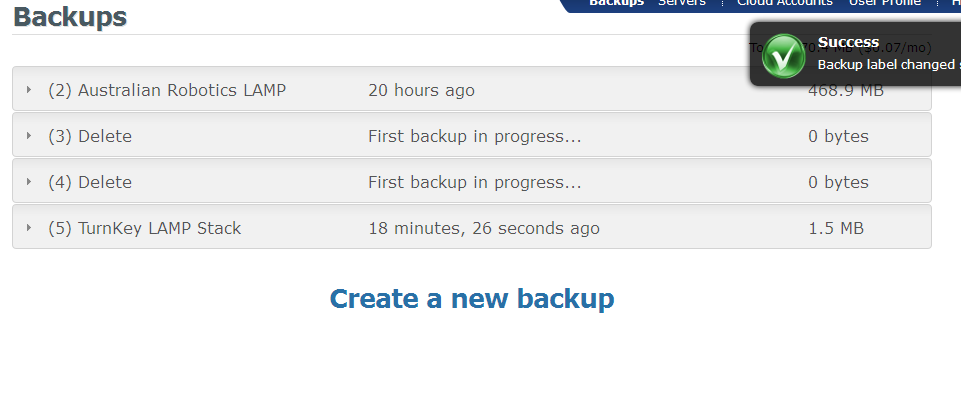
I've had a couple backups fail before they can complete (they are stuck in the status "First backup in progress...") I cannot delete them as there is no option to remove an In Progress backup.
For now I've labeled them as "Delete" and try to ignore them.
I'm surprised I wasn't able to find any discussion about this. Maybe my searching skills are soft at the moment.
Is there any easy way to combine the appliances together? The real benefit of turnkey appliances is the out of the box configuration is already done. But since I'm running a home server on old hardware, I'd like to use it for multiple purposes without needing to go through hours of configuratino to get all the pieces I want.
I've successfully installed a LAMP appliance on VMWare, but when backing up and restoring, the Mysql is not operational on either EC2 restores or a restore to a blank Turnkey LAMP appliance. Any ideas or any settings i need to tweak to get this running?
Trying to login into the mysql terminal or phpMyAdmin with my root account does not work (access is denied) even though this is fine on the original LAMP appliance which I backed up.
Please help as I'd like to get a backup/restore workflow going!
Yes I'm a newb to the Turnkey Linux thing, as well as EC2. All I'm trying to do is open up a different port to run a virtual host. I've added port 85 to the EC2 security group, and added an accept rule to the Linux Firewall for port 85 coming from any address. I've also created a virtual host that responds to any inbound address on port 85. However, the connection is getting refused.