I've been working with the Samba Turnkey appliance and I'm trying to set up user disk space quotas for our Network Attached Storage (NAS). Using the webmin mount module and the the smbfs package, I set our NAS to be mounted to a local folder accessible to the user. I then installed the webmin quota module and the quota package. After some wrangling this allowed me to set up user quotas on the local file system.
Hi my name is Dirk and I am new to Turnkey.
May be I am too silly to start or configure an image using vmware player,
but at the moment I am totally frustrated.
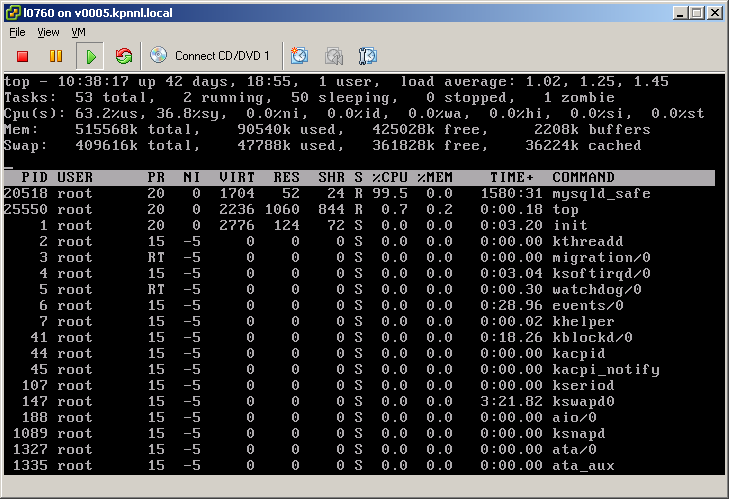
Last week I started getting "out of memory" errors in my 2009.6 mediawiki (MW) VM. After doing an apt-get upgrade, things would work fine for a while until the console would be soiled with error such as (see screenshot):
Out of memory: kill process 5023 (apache2) score 225331 or a child
Killed process 5023 (apache2)
Out of memory: kill process 4497 (mysqld) scrore 32182 or a child
Killed process 4497 (mysqld)
Firefox just shows a blank page, Chrome reports an error:
Hopefully someone here can help me with this beginner's problem.
I've successfully installed the RoR appliance to harddisk on a standalone server, and was able to access the webmin interface from another computer on the same network.
After I got all that running, I tried following the instructions found here on how to deploy a Rails app: http://www.turnkeylinux.org/docs/rails/deployment .... to try out the example on the server...but to no success.
The TKL fileserver VM version default for available storage is about 20GB. I am using it for a backup and have exceeded 20GB, even though the host computer's hard drive is larger.
Is there a way to increase this amount, or to add external drives? I am using it with VirtualBox.
joomla site is working, but am unable to install Akeeba or any other component - am hoping that activating the FTP layer for the joomla back end will get this working.
I know how to use cpanel to create an FTP account, but have looked at every menu option on the webmin app and can't find an equivalent.
How do we create an ftp account on the joomla appliance?
For evaluation purposes, I used your Redmine appliance as an ISO and loaded into VMWare WorkStation on my desktop. I upgraded Redmine, configured PostFix for email, added plugins, setup projects, etc.
1. How can I deploy my VM directly to Amazon Cloud services?
2. Will that still ensure TurnKey gets credit (well deserved) for creating the appliance?
Or, will it be necessary to start back from the beginning by deploying your applianced to EC2 and then redoing the upgrade, setup, and configuration of RedMine and PostFix?
The TKL fileserver would be great for me, but it won't blank the server screen.
The appliance is running on a Thinkpad, so the screen can't be switched off.
The BIOS is set to blank the screen after 5 minutes of idle, but the appliance will never go idle even if no other computers are on the network. Also, quitting the config screen doesn't help.