The OTRS developers are kind enough to have an update scoreboard available when you first log into OTRS to see what patching needs to be done. This image was supposedly updated August 21, 2012...
We are looking into setting up a wiki server, and the installation that looks the most promising is the MediaWiki appliance. The excerpt from an e-mail shown below was from one of our group members concerning the appliance:
...the bundled extensions don't include Math and Wiki2LaTeX...if the bundle also lacks the underlying latex utilities that are required by those extensions. Would we be able to add them if they're missing?
I've just set up a turnkey ushahidi instance. However it is an old version (v2.3.2) instead of the current version (v2.6.1). I tried to use the automatic ushahidi upgrade function, but it reports that the download failed.
I wanted to activate extendedstatus on my wordpress alliance so I can monitor what goes on with apache with a monitoring tool. After some reading I get on to trying to do this.
And looking for the right config files I see that there is a /etc/apache2/mods-available/status.conf and the status module is activated.
But it doesn't seem to work. I get a 404 when trying to acces /server-status om my site.
Folks I have no clue about this one. I have Turnkey Wordpress installed on an ESXi host. All was going fine and I created quite a bit of content - testing the site as I went along. Now, coming back a day later the site does not display. Rather, I see an "Index of" empty directory listing. I can still get to wp-admin as normal. There were no changes except content via wp-admin. I've ssh'd to the box and the page directory is still intact and all looks fine. Very odd. I'm thinking somehow some permissions got mashed. But, maybe no. And, I'm not sure what to check.
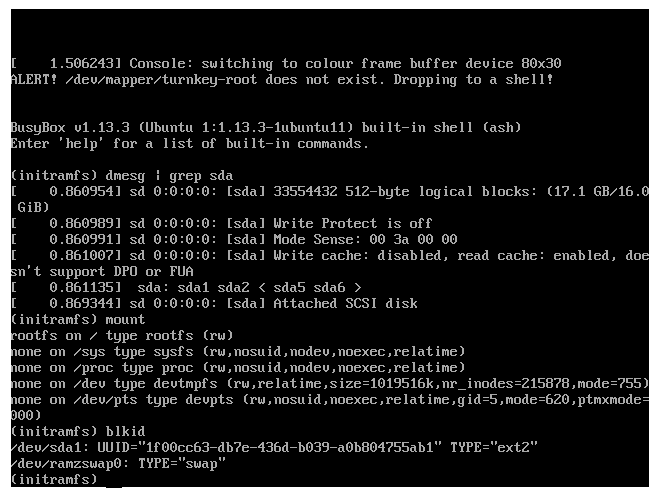
I was running out of space on my root partition for an OTRS instance of Turnkey-Linux, so I tried to follow the instructions given on blog entry: http://www.turnkeylinux.org/blog/extending-lvm
I first powered down the Turnkey VM, increased the virtual disk size in XenServer from 8GB to 16GB, and started the VM again.
Once it had loaded, I started cfdisk, and created a new partion (sda6) filling up the 8GB free space.