I have configured all that I know to config.. Had the site for a bit "mago.tklapp.com" but then can't get back to it even with the IP address in Magento front and back ends.
Did just get to IPAddress:Webmin but the tklapp does not find it (and it seems TKLAPP can't find it either)
Hello, I created a brand new AWS instance using your Turnkey product. Everything was going well until I tried to log in to the back end of my Zen cart site.
I used the user Admin (tried both admin and Admin) and the password that I input upon creation.
Upon navigating to the login screen, this combo did not work. Neither did email+pw.
I then tried the Forgot Password feature. Entered my email, an hour later, no emails from the system. Email address is verified correct in DB.
I fooled around for a day trying to fix that it seemed to be unable to find the network no matter what I did. Finally, I got frustrated and "Ctrl C"ed to the prompt and logged in as root.
Every appears to be there but no desktop, I am connected to the network and OwnCloud is installed and works more or less.
So the question is what do I do. I intend to run headless using ssh and if I can get a desktop I want to use VNC for communication.
I want to use the Bootstrap plugin for adding a theme to Vanilla (supported) but it requires version 2.1.x. My AWS subscription says I'm version 13 - which doesn't seem to be the same version family.
What version am I, and since I realize I'm probably not 2.1.x - how can I upgrade my subscription to that?
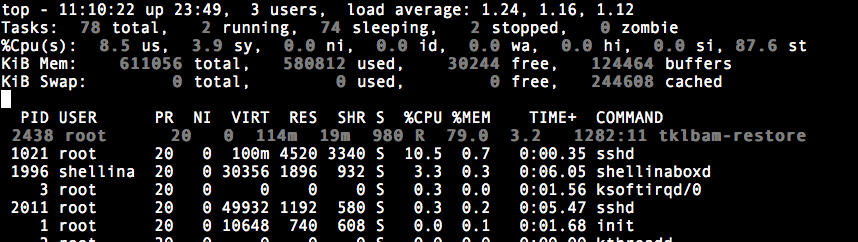
I'm testing my restore procedure, and for the first time ever using an AWS cloudserver, via the HUB. Almost 24 hrs later now. Seems the restore has been done. I see files from the backup, not sure if it's 100%.
But in top, tklbam-restore is still hugging all available cpu. tail /var/log/tklbam-restore doesn't show any new progress.
What is keeping it busy and why? How can I find out more on what is happening?
I had a small issue with ProjectPier. I downloaded the ISO file and installed it on a local virtual machine. After the initial TKL configuration screens, I tried to access ProjectPier via a browser. The browser displayed the following error message:
Hi all, I've stumbled my way through setting up a moodle deployment, but have ended up with two AWS instances, a micro and a small, I'm almost certain that I only want a small, but both DNS point to the same active moodle location.. thoughts?
Also, what setting do I need to attack to enable https? THe site is giving new users the warning about it being unsecure in chrome.